 Shotodo
 By
What is breaking in your business that a scheduling app should fix?
Before picking an app, name the failure you actually see each week. Most scheduling pain is one of four things, and each points to a different tool.
Four failures that look like one problem: no-shows, double-bookings, coverage gaps, back-and-forth booking texts
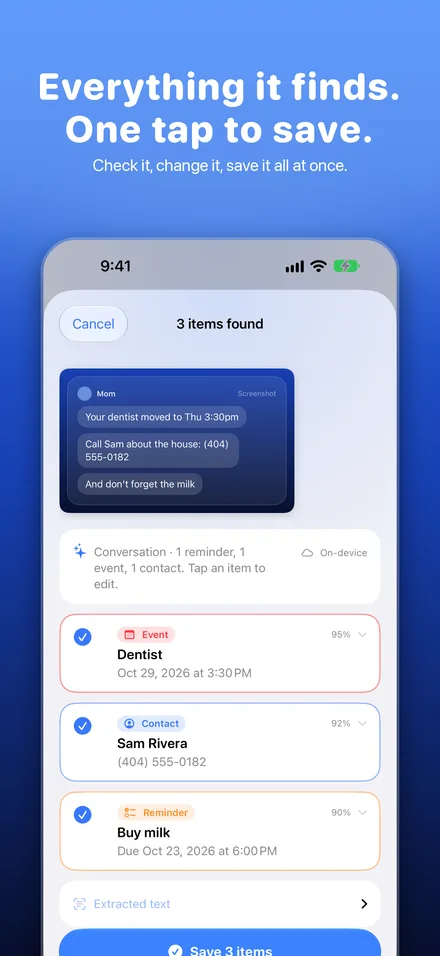
No-shows mean clients forget: you need reminders, not a prettier calendar. Double-bookings mean two people grabbed the same slot: you need a single source of truth. Coverage gaps mean staff shifts aren't visible to each other. And the fourth failure is the one parents and solo operators know best: the booking itself lives in a text thread, a school email, or a group chat. If that's you, a screenshot-to-task app like Shotodo turns a dentist appointment screenshot into a calendar entry, so it's done without retyping. Shotodo sits in the productivity category on the App Store, alongside competitors like SnapAction and Shotted, with pricing listed on Shotodo's pricing page.
Why 'best app' lists fail: they rank features, not your failure
Generic roundups rank feature lists, which is why the same roundup can recommend an app that solves none of your problems. Reviewers admit it: "I've tried more productivity apps than I'd like to admit," and "most of them aren't worth the download" (101planners). Honest criteria start with your failure, then match a category. Shotodo, for example, fixes the text-thread problem but won't stop a client no-show on its own; you'd still need reminders.
When do you need client self-booking versus internal staff scheduling?
The two app categories fix different failures. Pick based on where your bookings actually break down.
Client self-booking: fixing the text-message booking loop
If clients book by texting you, you're stuck typing every appointment into your calendar by hand, and double-bookings happen when you miss a message. Self-booking apps give clients a link to pick their own slot, which stops the back-and-forth. If your problem is "too many messages, not enough calendar," this is your category.
Internal staff scheduling: fixing coverage gaps and shift swaps
If your problem is who works when, staff scheduling apps assign shifts and let teammates swap coverage without you playing middleman. This fixes no-show shifts and last-minute scrambles, not client bookings.
| Client self-booking | Internal staff scheduling | |
|---|---|---|
| Problem it fixes | Text-message booking loop, double-bookings | Coverage gaps, shift swaps |
| Who books | Clients | You or your team |
| Best for | Salons, tutors, consultants | Teams of two or more |
Solo operators: you may need neither
If you're one person whose bookings arrive as texts, emails, and screenshots, a screenshot-to-task app like Shotodo turns a screenshot of a client text into a calendar event or reminder without a booking page. It won't let clients self-book or manage staff, so it works best alongside or instead of the categories above when you're the whole schedule.
Which features actually reduce no-shows and double-bookings?
Automated reminders: the no-show fix
Reminders are the only feature that directly attacks no-shows. A client who booked three weeks ago forgets; an automatic text or push notification the day before brings them back. Todoist supports location-based and time-based reminders on paid plans (see its reminder help docs), and most scheduling apps treat reminders as a core setting rather than an add-on.
Real-time availability sync: the double-booking fix
Double-bookings happen when two calendars hold different truths. The fix is syncing availability in real time across every calendar you use, so a slot booked on your phone vanishes everywhere else the moment it's taken. If an app only syncs once an hour, or only one-way, you will still collide during a busy day.
What reminder features do not fix
Reminders fix forgetting, not overcommitment. If your calendar has two things at 3pm, a reminder for both just reminds you twice that you're double-booked. That is why the honest pairing is reminders plus live availability sync, and why we built Shotodo to handle both: snap a screenshot of a school email or a client text and it becomes a reminder or calendar event in seconds, which cuts the typing that stops busy parents from logging appointments at all. It does not yet offer client self-booking, so a salon or tutor still needs a dedicated booking page alongside it. Compare that against competitors like SnapAction or Shotted, whose pricing pages change often enough that we won't quote numbers here.
What can a free small business scheduling app realistically handle before you must pay?
What free tiers typically cover
A free tier usually handles one calendar, one user, and basic reminders. If you're a solo operator booking a handful of clients a week, that covers the failure you're fixing: missed appointments and double-bookings. For household use, a free screenshot-to-task app like Shotodo turns a dentist appointment from a school email into a calendar entry and reminder without typing, and the privacy policy at https://shotodo.app/privacy/ explains what happens to your screenshots.
The trigger points that force an upgrade
You pay when one of three things breaks. First, staff: the moment two people need their own calendars and coverage rules, free tiers typically stop. Second, client self-booking: letting clients pick their own slots usually sits behind a paid plan. Third, volume: if reminders or bookings hit the tier's monthly cap, you'll get cut off mid-month, which is worse than paying from the start.
How should a solo operator's app choice differ from a team of five or more?
Solo: calendar and reminders may be enough
If you book clients yourself and see them one at a time, you may not need a dedicated scheduling program yet. Your iPhone calendar plus a screenshot-to-task app like Shotodo covers the core loop: see the dentist appointment or client text, screenshot it, it's done. The failure mode you're fixing is forgetting, not coordination.
Two to five people: shared availability becomes the problem
The moment someone else can take the appointment, your personal calendar stops being the truth. Now you need shared availability, a way to hand off bookings, and reminders that go to clients, not just to you. Reminder texts matter here: a systematic review of mobile phone appointment reminders found they reduce missed appointments (JAMIA).
Five plus: you need a real small business scheduling program
At five or more staff, double-bookings and coverage gaps outgrow lightweight tools. You're choosing a dedicated small business appointment scheduling app with per-staff calendars and client self-booking, and honestly, that is beyond what Shotodo is built for. Track what we do support at https://shotodo.app/changelog/.
Where does a screenshot-to-task app fit in your scheduling stack?
The problem Shotodo fixes: appointments buried in texts and school emails
Shotodo turns a screenshot into a task. Screenshot the dentist appointment in a school email, the practice time from the team group chat, or the reminder buried in a family text, and it becomes a reminder or calendar event without you typing a word. If your calendar lives in your Messages and Mail apps instead of any scheduling tool, this is the missing front door.
Where it falls short: no client self-booking, no staff coverage
Shotodo does not let clients book time with you, send confirmation texts, or show which staff member covers which shift. If double-bookings or no-shows are the failure you are fixing, you still need a booking tool. Shotodo captures appointments that already exist; it does not create or manage them.
Running Shotodo through the same criteria as every other category
By this guide's own tests, Shotodo fails two of them: it cannot take client bookings and cannot schedule staff. It wins on a different test: zero setup and zero typing for a parent whose appointments arrive as screenshots. Use it as the capture layer, paired with whatever handles bookings.
What do switching costs look like when you outgrow your first scheduling program?
The real cost of switching is rarely the subscription. It's the bookings, client notes, and reminder history trapped inside the old app. Before you commit, check what exports exist: if your appointments and client details can only leave as screenshots or a PDF, plan on re-entering them by hand.
What you can export and what you can't
Most scheduling tools export a CSV of past bookings, but recurring client preferences, message threads, and payment history often don't travel. Anything synced to Apple Calendar or Reminders usually survives a move, since iOS 26 keeps those shared calendars and reminder lists updating across apps and devices (Apple support documentation). Data stored only inside the app itself is the part you'll retype.
Choosing by category first reduces switching pain
Pick the category that matches your failure mode before you pick a brand. A screenshot-to-task app like Shotodo feeds reminders and calendar events into Apple's own apps, so your history stays in Calendar and Reminders even if you stop using it. A family planner such as FamPlanIt, or a self-booking tool, holds more inside its own database, which raises the exit cost. Start where your data ends up somewhere you already own.
How do you trial an appointment scheduling app in one week without disrupting bookings?
Pick the failure that hurts most, then test only that. A week is enough if you keep real bookings on your current method the whole time.
Days 1-2: run your real failure through it
Feed the app the actual mess that made you search. For a screenshot-to-task app like Shotodo, that means screenshotting a school email about picture day, a dentist appointment text, and a client booking message, then checking each lands in the right place as a reminder or calendar event. If it takes more than a few taps per item, it fails.
Days 3-5: double-run with your current method
Enter every new booking or family commitment twice: once in the app, once in your existing calendar or planner. At day five, compare. Missed anything? Duplicated anything? This costs ten minutes a day and catches gaps before they cost you a real client.
Days 6-7: decide with three questions
Did it catch your specific failure? Did double-entry feel pointless by day four because you trusted the app? Would you pay for it, or uninstall it? Honest answers, then commit or move on.
FAQ
Is there a small business scheduling app free with no booking limits?
Truly unlimited free tiers are rare. Free plans usually cover one calendar, one user, and basic reminders, which is enough for a solo operator seeing a few clients a week. Limits hit when you add staff calendars, client self-booking, or cross a monthly reminder or booking cap. If two or more people need coverage rules, expect to pay.
Can an app turn a screenshot of an appointment text into a calendar event on iPhone?
Yes. Screenshot-to-task apps like Shotodo turn a screenshot of a client text, school email, or group chat message into a calendar event or reminder without retyping anything. This works well when your appointments live in Messages and Mail rather than a booking page. It captures appointments that already exist; it does not let clients book new slots.
What's the best employee scheduling app for small business with hourly staff?
Look in the internal staff scheduling category rather than client booking tools. The features that matter for hourly teams are per-staff calendars, shift assignments, and self-serve shift swaps so you stop playing middleman on coverage gaps. At five or more staff, lightweight calendar apps and screenshot-to-task tools outgrow the problem; you need a dedicated scheduling program.
Do clients need to download an app to book an appointment with me?
No. Client self-booking tools give you a link to send by text or email, and clients pick their own slot from that page in a browser. No download required on their end. This category fixes the text-message booking loop and the double-bookings that come from missed messages. Solo operators without a booking page can use a screenshot-to-task app instead.
How much should a small business scheduling program cost per month?
Pricing varies widely by category and vendor, and competitor pricing pages change often enough that quoting numbers goes stale fast. Expect free tiers to cover solo use, with paid plans triggering on staff accounts, client self-booking, or volume caps. Check each vendor's pricing page directly, and weigh the exit cost: data trapped only inside the app raises switching expenses later.
Recap
- Pick a scheduling app by the specific failure it fixes: no-shows, double-bookings, coverage gaps, or bookings buried in text threads.
- Automated reminders reduce no-shows, while real-time availability sync is the only fix for double-bookings.
- Solo operators whose appointments arrive as texts or emails can use a screenshot-to-task app like Shotodo instead of a booking page.
- Free tiers typically cover one calendar, one user, and basic reminders; staff accounts, client self-booking, and volume caps trigger paid plans.
- Choose your app category before your brand, and prefer tools that store data in Apple Calendar or Reminders to lower switching costs.
This page began as an AI draft. Shotodo is responsible for it. Found a mistake? [email protected].