 Shotodo
 By
The short version
- Test any meal plan app with grocery list by planning three overlapping recipes and checking whether the generated list is accurate, merged, and shop-ready.
- Ingredient merging is the key differentiator: shared items like chicken or tomatoes should appear once with quantities combined, not as duplicate lines.
- A pantry feature only works if flagged staples disappear from the list automatically, not if you tick items off by hand after the list is built.
- Screenshot-based apps like Shotodo turn school emails, spouse texts, and group chats into list entries in one tap, eliminating retyping.
- A paid app earns its keep by removing retyping and app-switching, not by adding features.
What makes a meal plan app with grocery list actually good?
Judge a meal plan app with grocery list on four things before you commit. First, does a planned dinner actually turn into a list you can shop from, without retyping anything? Second, when two recipes both call for milk or onions, does the list combine them or hand you a messy duplicate? Third, can you cross off what's already in the pantry and have the list update? Fourth, when the plan arrives as a school email or a group chat screenshot, can you save it in one tap?
Check each app's App Store listing to confirm what it claims before you download (App Store listings). Privacy matters too when family plans pass through the app; Shotodo explains its handling at shotodo.app/privacy.
How do you test grocery list accuracy in a meal planner app with grocery list?
Pick three recipes you actually cook, plan them across one week in the app, and check the shopping list it produces against what you would have written by hand. That's the whole test. It takes about twenty minutes and it tells you more than any feature list.
The three-recipe test
Choose recipes that overlap on purpose. Two should share an ingredient, like chicken or pasta, and one should include something you already have at home. Plan all three, then read the generated list line by line and ask one question: could I shop from this without fixing it first?
Scoring ingredient merging
This is where most apps earn or lose your trust, so it deserves a slow read.
If chicken appears in Tuesday's stir-fry and Friday's tray bake, the list should show one chicken entry, not two separate lines you'll discover at checkout. Merging fails in sneaky ways: "2 chicken breasts" and "300g chicken" sitting side by side is technically two lines but practically one shopping mistake waiting to happen. Score merging on three levels. Best: shared items appear once with both amounts combined.
Acceptable: items appear once but you must add the amounts yourself. Fail: duplicates you'll only spot in aisle four. Run the same check on any app you try, including Shotodo, and be honest about what you find; the changelog at https://shotodo.app/changelog/ shows how often merging rules get fixed, which tells you whether the developer treats this as a core job or a nice-to-have.
Scoring quantity aggregation and pantry removal
Now check the maths. If one recipe needs 2 tablespoons of soy sauce and another needs 3, does the list say 5, or does it say "soy sauce" with no amount? Vague quantities force you back into the recipes mid-shop, which defeats the point. Finally, mark one ingredient as already in your pantry, if the app allows it, and confirm it disappears from the list without taking the wrong item with it. An app that passes all three checks is one you can hand your spouse with confidence.
Which apps pass the ingredient merging test?
The test is simple: plan two dinners that both use chicken, and check whether the shopping list shows one chicken line or two. An app that merges shared ingredients saves you a second pass through the list at the shop; one that doesn't means duplicate entries and doubled quantities to untangle yourself.
Here's how the apps in this comparison handle that same scenario:
| App | Merges repeated ingredients? | What the list shows |
|---|---|---|
| FamPlanIt - Family Planner | Built for shared family planning, so meals and lists live together | One combined list per week |
| Todoist: To Do List & Calendar | List-first, not meal-first | Separate line items you merge yourself |
| Shotodo | Screenshot a plan or recipe text, save it, and it's on your list | One tap per saved item, no retyping |
Todoist's own help pages cover list behaviour but treat merging as manual housekeeping, which is fair for a general to-do app (Todoist Help). The honest gap for Shotodo: it saves what you screenshot quickly, so merging repeated items is one tap per item rather than automatic. That still beats retyping the school email by hand.
Do quantities add up correctly when recipes share ingredients?
Pasta on Tuesday and soup on Thursday both call for 400g of tomatoes. A good meal plan app with grocery list adds them: 800g on one line. A weak one lists tomatoes twice, and you buy two bags when one would do.
Run the same two-recipe test in every app you try. Pick one ingredient that appears in both recipes with different amounts, and check whether the shopping list shows a single combined line or two duplicates. Then check the units: 2 cups plus 1.5 cups should read 3.5 cups, not "3.5" scrambled into fractions or left as separate entries.
This matters most on shop day. If you're standing in the dairy aisle wondering whether two lines mean two blocks of cheese or one, the app failed. The honest way to test Shotodo: screenshot two recipes that share an ingredient, save both, and see whether the list merges them or repeats them. If it repeats them, you're retyping the fix yourself, which defeats the point. Pricing is at https://shotodo.app/pricing/.
Can a meal planner with grocery list app remove what you already have?
The best test of a pantry feature is simple: mark milk, eggs and pasta as "already have it," plan three dinners that use them, and check whether they still show up on the list. Apps that only let you tick items off after the list is built fail this test, because you are still doing the checking by hand every week. The honest middle ground: most planners get the removal right for staples you flag once, and get it wrong for the half-used things in your fridge. If the app guesses wrong, you either buy a second bottle of soy sauce or stand in the shop unsure. That is why a screenshot habit still matters. Snap the fridge before you shop, save it to your list in one tap, and you have a record without retyping anything (https://shotodo.app/about/).
The payoff is real. Workers toggle between apps 1,200 times a day, losing nearly four hours a week just refocusing. Fewer apps between your fridge and your list means fewer missed items.
How do plans arriving as texts and emails become list items?
Most of the week's plan never starts as a plan. It starts as a text from your spouse ("pick up milk and the dry cleaning"), a school email about a form due Monday, or a group chat thread about the Saturday party at 2. The question for any meal plan app with grocery list is simple: how much of that do you retype by hand?
Screenshot it, it's done: the low-typing path
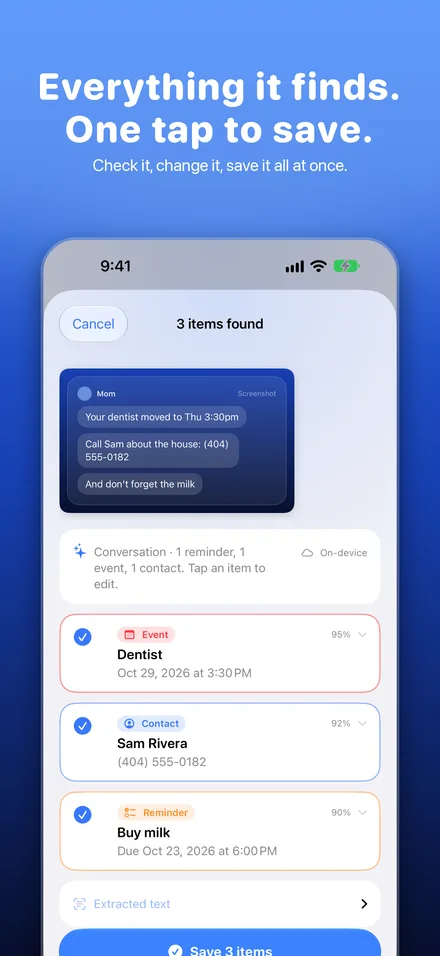
Shotodo takes the screenshot route. Snap the text or email, Shotodo reads it, one tap and it's saved as a reminder. No retyping, no switching apps mid-shop.
SnapLater, Shotted and SnapAction work in the same screenshot-to-task space, so the honest test is the same for all of them: screenshot a messy group chat with three different items and see how many survive into your list correctly. Test that with your real school emails before committing.
How much should you pay for an app for meal planning and grocery list use?
Most meal planners split into three pricing shapes: free apps that cover the basics, one-time purchases, and subscriptions that bill monthly or yearly. Free works if you plan two dinners a week and don't mind retyping a few items. Paid starts earning its keep when the app reliably turns a screenshot of a school email or a group chat into a reminder or list entry, because that's where the typing disappears.
The honest test: count how many minutes a free tool costs you per week in retyping and app-jumping. Planning across a calendar, a list and a notes app means constant switching, and that jumping is exactly what makes planning feel like its own chore (MakeUseOf). If a paid app removes that, it pays for itself in saved typing, not features.
Which meal plan app with grocery list should your family pick?
Match the app to how your plans actually arrive. If dinners come from recipes you choose yourself, a dedicated meal planner with a grocery list is the straightest path. If your week arrives as school emails, spouse texts and group chats, Shotodo fits better: screenshot it, Shotodo it, and it's saved as a reminder or calendar entry without retyping.
Run every option through the same test. SnapLater, Shotted and SnapAction all work on screenshots directly, so try the same party invite in each and see which saves it correctly in one tap. FamPlanIt and Todoist suit families who want shared lists and calendars in one place.
Honestly, Shotodo has limits in this test: it saves what a screenshot says, it doesn't merge ingredients across recipes or sort a list by aisle. If your shopping list needs to add up quantities, pick a dedicated meal planner. If your problem is "no more typing," screenshot it and get on with your day.
FAQ
Is there a free meal planner app with grocery list that merges duplicate ingredients?
Free meal planners usually cover the basics but treat merging as manual work, so you combine duplicate lines yourself. Some paid planners combine shared ingredients automatically. Run the two-recipe test before committing: plan two dinners that both use chicken, and check whether the list shows one line or two. That twenty-minute check tells you more than any pricing page.
Can I add items to the grocery list from a text message without typing them in?
Yes. Screenshot the text or email, save it, and the app turns it into a list entry in one tap. Shotodo, SnapLater, Shotted and SnapAction all work this way. Test with a messy group chat containing three items and see how many survive into your list correctly. No retyping, no switching apps mid-shop.
Do these apps let my spouse see and tick off the same shopping list?
Some do. FamPlanIt is built for shared family planning, so meals and lists live together and everyone works from one combined weekly list. Todoist supports shared projects too, though it's list-first rather than meal-first. Check the app's sharing setup before downloading, because tick-off syncing between two phones is exactly where weaker apps fall over.
What's the difference between a meal planner with grocery list app and just using Apple Reminders?
Apple Reminders gives you a list you type and tick yourself. It won't turn planned dinners into ingredients, combine two chicken entries into one, or save a school email screenshot as an item without retyping. A dedicated planner automates at least part of that. If your plans arrive as texts and emails, a screenshot-based app removes most of the typing.
How this guide was made: drafted with AI help, published by Shotodo. See a mistake? Write to [email protected] and it gets fixed.