 Shotodo
 By
In brief
- Business reminder apps send SMS to clients and track confirmations; personal reminder apps capture your own appointments without retyping.
- Most free appointment reminder apps are trials in disguise, so check monthly reminder limits and what happens to saved items if you cancel.
- A 72/24/2 reminder cadence with two-way reply wording reduces no-shows without annoying clients.
- Solo operators can skip paid reminder software by using calendar alerts plus a saved text template pasted manually.
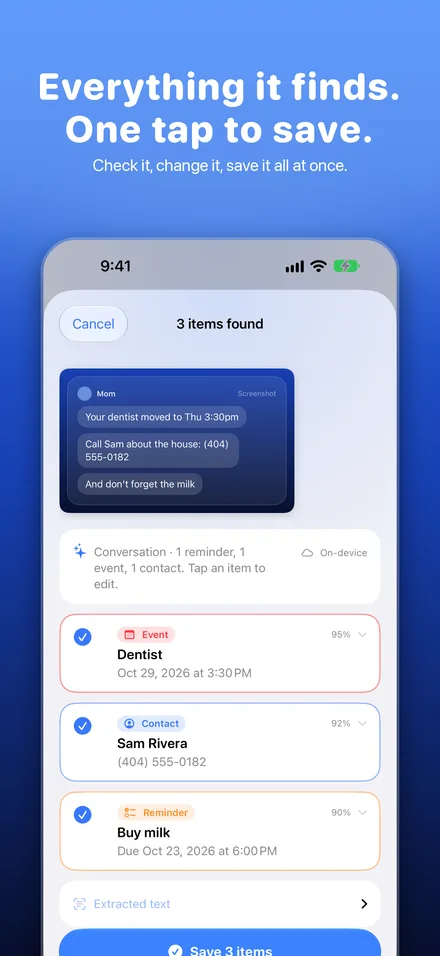
- Shotodo turns a screenshot of a school email or confirmation text into a saved reminder in one tap, but it won't message anyone else.
What features separate a business appointment reminder app from a personal one?
Business reminder apps send messages to other people. A salon or dental office uses one to text clients before appointments, let them confirm or reschedule, and cut no-shows. Personal reminder apps remind you about your own life: the dentist appointment you booked by phone, the party buried in a school email, the form due Monday.
What a business reminder app must do
It sends SMS at scale, tracks confirmations, and often lets clients reschedule themselves. Text is the default because it gets read: SMS messages see open rates around 98 percent versus roughly 20 percent for email, per SMS marketing benchmarks. If you serve clients, you need delivery and replies, not note-taking.
What a personal reminder app must do
It grabs the appointment from wherever it arrived and puts it in your calendar or Reminders without retyping. Shotodo does this from a screenshot: snap the school email or group chat, tap once, it's saved. No more typing.
Which side are you on? If reminders go to clients, compare business tools. If they arrive as texts and screenshots aimed at you, compare capture tools.
Which appointment reminder apps are actually free versus free trials?
Most "free" appointment reminder apps are trials in disguise: they let you send a handful of reminders, then ask for a card. A genuinely free tier keeps working after the trial window, while a freemium tier works forever but limits how many reminders you can send or which features you can touch. The difference matters if you're a solo operator sending a few client texts a week, or a parent who just needs reminders to keep firing for the school run and the dentist.
Free-tier comparison table
| App | Free tier? | What the free version does | Best for |
|---|---|---|---|
| Shotodo | 7-day free trial | Turns a screenshot of an email, text, or flyer into a saved reminder in one tap | Parents capturing plans from school emails and group chats |
| SnapLater | Varies | Screenshot-to-reminder capture | Personal capture |
| Shotted | Varies | Screenshot-to-reminder capture | Personal capture |
| SnapAction | Varies | Screenshot-to-reminder capture | Personal capture |
| FamPlanIt - Family Planner | Varies | Shared family planning | Household calendars |
| Todoist: To Do List & Calendar | Varies | To-do list with reminders | Personal task lists |
How to read a free tier before you commit
Check three things: how many reminders you can send per month, whether the reminder still fires if you stop paying, and what happens to your saved items if you cancel. For screenshot-based tools like Shotodo, also read how your screenshots are handled before you trial it: https://shotodo.app/privacy/
Shotodo's honest limitation: the 7-day trial ends, and after that you're paying. It's built for personal capture, not for sending SMS reminders to clients, so a salon or dental office will outgrow it fast.
Which appointment reminder app fits a solo operator versus a multi-location business?
Dental practices
Dental offices lose real money to empty chairs: one analysis of dental practice data puts the industry no-show rate around 10% of appointments, which is why dedicated reminder software with confirmations and cancellation rules exists (https://www.dentistryiq.com). If you run a practice, you need SMS delivery, client self-service rescheduling, and deposit or cancellation policies. A solo dentist can start with text reminders from existing tools; a multi-location practice needs those rules enforced the same way at every chair.
Salons and barbers
Salons live and die on the Saturday slot. You need SMS reminders plus easy rescheduling, because a client who can't move an appointment just doesn't show. Cancellation fees matter here more than in consulting, since a missed cut can't be resold at 9pm.
Consultants and solo operators
Here's the honest part: if you're a solo operator, you may not need paid reminder software at all. Your calendar already sends alerts, your clients are few, and a screenshot of the confirmation email dropped into Shotodo saves you retyping the details, then it's saved and you get on with your day. That's the whole loop, and the changelog (https://shotodo.app/changelog/) shows the capture flow keeps getting faster. Where Shotodo falls short: it won't text your client for you or enforce a deposit, so the moment you need confirmations at scale, graduate to a booking tool. Multi-location businesses should skip the DIY route entirely; the cost of one missed appointment across five locations pays for the software.
When should a business use SMS reminders instead of email or cards?
Text messages get read. Most people open a text within minutes of it arriving, while marketing emails often sit unopened for a day or more, and a printed card depends on the client pinning it somewhere they'll actually look. For a salon, a dentist, or a solo consultant, that gap is the whole decision.
Use SMS when the appointment is time-sensitive and the no-show costs you money: same-week bookings, clients who book on their phone, or anyone under 40 who treats email as a spam folder. Use email when you need to attach forms, policies, or prep instructions. Use cards for older client bases who expect something physical, or as a backup handed over at booking.
The honest rule of thumb: SMS for the reminder itself, email for the paperwork, cards only when your clients tell you they want them. One channel rarely covers everyone, which is why the timing settings in the next section matter as much as the channel you pick.
How do dentist appointment reminder cards compare to text reminders?
Printed reminder cards cost a practice roughly 10–30 cents each in card stock plus staff time at the front desk, and they only work if the patient keeps the card. Text reminders arrive the day before, land in the pocket the card never reaches, and are far harder to lose. Studies of appointment reminders consistently show that text messages reduce missed appointments compared with no reminder at all, which is why most dental associations encourage their use (American Dental Association).
Cards still do one job well: they carry the next appointment date home from the chair, so patients can add it to their calendar without a phone call. That's why many practices run both, a card at checkout and a text the day before.
If you're the patient, the card is just another piece of paper to retype. Screenshot it and Shotodo turns it into a reminder in one tap, so the next cleaning lands in your calendar without any typing.
What reminder settings reduce no-shows without annoying clients?
The 72/24/2 cadence
Send three reminders: 72 hours out so clients can still reschedule without scrambling, 24 hours out for the confirmation, and 2 hours before for anyone who forgot. Three is the ceiling. More than that and people start muting your number, which defeats the whole point. The 72-hour text matters most for appointments people book weeks ahead, like a hygienist slot or a consult.
Wording that gets confirmations
Ask for a reply, not just attention. "Reply Y to confirm, R to reschedule" gets a response; "This is a reminder" gets ignored. Keep the reply options to two, and make cancelling as easy as confirming. If cancelling takes more than two taps or a phone call, clients will just not show up instead, and you will be sitting on an empty chair either way. One-way texts feel like a lecture; a two-way text feels like a conversation people actually answer.
How do you send client appointment reminders without a full booking system?
If you run a salon or consultancy solo, you don't need booking software to send reminders. Save a text template in Notes ("Hi Maria, confirming your 2pm Thursday. Reply 1 to confirm") and paste it into your messages the morning of the appointment. It's manual, but it costs nothing and clients reply fast.
Calendar alerts work too: create the event, add a second alert 24 hours ahead, and let your phone nag you to send the text. The danger is you, not the client — if you skip the alert, nobody gets reminded.
If confirmations arrive as screenshots in your messages, a screenshot-to-task app like Shotodo fills the gap: screenshot it, save it as a reminder, get on with your day. Just don't expect it to send texts for you.
Mailed postcards are the old fallback, and they're not free — First-Class postcard postage alone runs about 61 cents per card before printing, per the USPS price calculator.
What's the best personal appointment reminder app for a family calendar?
For a family calendar, the honest answer is that you already own the best reminder tool: Apple Reminders and Calendar. What's missing isn't a better reminder, it's a faster way to get things into it. School emails, spouse texts, and group chats all arrive as screenshots and paragraphs, and retyping "party Saturday at 2" by hand is where things get dropped.
Compare your four realistic options:
| Approach | What it does | What it doesn't |
|---|---|---|
| Apple Reminders alone | Reliable alerts, already on your phone | You type every entry yourself |
| FamPlanIt - Family Planner | Shared family view | Family planning, not capture from other apps |
| Todoist: To Do List & Calendar | Strong task lists | General to-dos, not built around screenshots |
| Shotodo | Screenshot it, it's saved as a reminder, one tap | See below |
Where Shotodo fits and where it doesn't
Shotodo handles the capture side: screenshot a school email or a group chat message, and the appointment lands in your reminders without typing. That's the whole job.
But here's the shortfall worth quoting: Shotodo reminds you, it doesn't send anything to anyone else. Your spouse won't get a text, the babysitter won't get an alert, and there's no shared family view like FamPlanIt offers. It saves you the typing; the coordination is still on you and your existing calendar.
If your pain is "no more typing" and "never miss it," that trade is worth it. If your pain is getting everyone else on the same page, start with a family planner instead.
FAQ
Is there a completely free appointment reminder app with no limits?
Rarely for business use. Most tools that text clients are trials or freemium tiers that cap monthly reminders, then ask for a card. Your genuinely free options are manual: calendar alerts plus a saved text template you paste yourself. For personal reminders, Apple Reminders and Calendar are free and unlimited; the cost is typing every entry by hand.
Can I use a personal reminder app to remind my clients too?
No. Personal capture tools like Shotodo save appointments to your own calendar or Reminders. They don't send texts, track confirmations, or enforce cancellation policies, which is what a salon or dental office needs. If reminders must reach clients, use a business tool with SMS delivery, and reserve a personal app for appointments aimed at you.
How far in advance should appointment reminders be sent?
Use three touches: 72 hours out so clients can reschedule without scrambling, 24 hours out for the confirmation, and 2 hours before for anyone who forgot. Three is the ceiling; more and people mute your number. The 72-hour text matters most for bookings made weeks ahead, like a hygienist slot or a consult.
Do appointment reminder texts count against my phone plan?
If you send them manually from your own phone, yes: they use your normal messaging allowance. Business reminder apps send through their own SMS providers, so messages come from the app's number and are billed as part of your subscription or per-message fee, not your personal plan. Clients receiving them pay standard rates on their end.
What's the easiest way to turn a confirmation text into a calendar event on iPhone?
Screenshot the confirmation and use Shotodo: one tap saves it as a reminder without retyping the details. The manual route is copying the date and time, opening Calendar, and creating the event yourself, which is where details get dropped. Shotodo saves to your Reminders and calendar; it won't notify anyone else, so coordination stays on you.
Shotodo published this guide. A first draft came from an AI tool. Something wrong? Email [email protected].