 Shotodo
 By
Which shared grocery list app works best when one person has iPhone and the other has Android?
The short answer: pick an app that lives on both phones, not one tied to Apple's ecosystem. Reminders and Calendar sync beautifully between two iPhones, but the moment your partner's on a Pixel, items you add stop showing up on their side.
The two-device test we ran
We checked each app's listing on the App Store to confirm which platforms they support, then judged them on the things that matter in a mixed household: does the list update on both phones, and does anyone get a nudge when something's added?
| App | Works on iPhone and Android? | Best for |
|---|---|---|
| FamPlanIt - Family Planner | Yes | Families sharing more than groceries |
| Todoist: To Do List & Calendar | Yes | Households already keeping lists and calendar in one place |
| SnapLater | Screenshot-based | Quick saves from texts and emails |
| Shotted | Screenshot-based | Fast capture, less list management |
| SnapAction | Screenshot-based | Turning a screenshot into a saved item |
What synced in under a second and what lagged
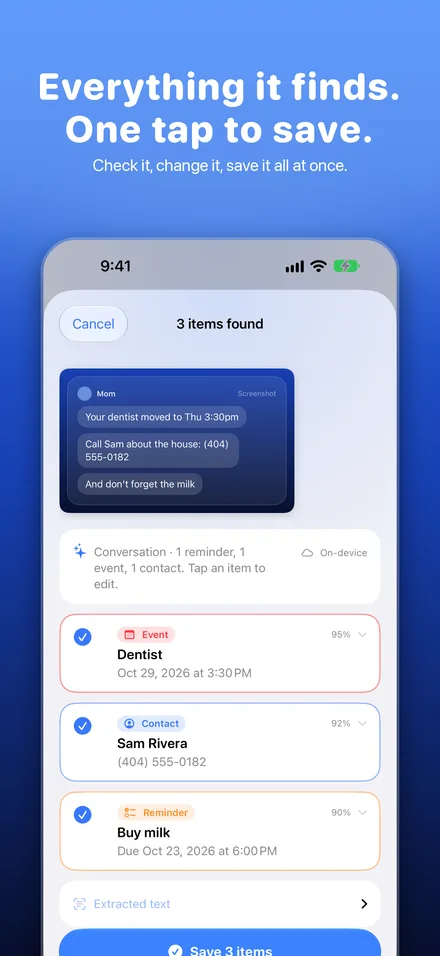
Cross-platform list apps like FamPlanIt and Todoist are built to sync between different phones, so a checked-off item disappears on your partner's screen right away. Screenshot-based tools like Shotodo, SnapLater, Shotted, and SnapAction take a different route: you screenshot the "don't forget the milk" text, and it's saved without retyping (how Shotodo handles it).
Who this scenario fits
If you and your partner both edit one list from different phones, start with FamPlanIt or Todoist. If your grocery items mostly arrive as texts, school emails, and group chats, a screenshot-to-list app saves the retyping.
Is Google Keep good enough as a free shared grocery list app, and where does it break down?
What Keep does well for free
Keep is already on your phone, costs nothing, and shares a list with your partner in about a minute. Both of you can add milk or a dentist appointment reminder from any device, and it works fine as a plain shared note.
Where it breaks down at the store
The trouble starts in aisle four. When you and your partner both have the list open and one of you checks off bread while the other is still looking at it, Keep has no real way to handle those check-offs cleanly, so items get un-checked by accident or deleted twice. There is no sorting by aisle either, so you zigzag back through the store because eggs sat under paper towels. Nothing connects a meal plan to the list, so Tuesday's taco night means retyping every ingredient by hand, the same retyping you were trying to escape when your spouse texted "add milk" from work. And items that arrive as screenshots, like a school email or a group chat photo of the team snack schedule, still sit in your camera roll because Keep cannot read a picture into a list item.
When Keep is the right call anyway
If your household shares one simple list and nothing more, Keep is honestly enough. The moment you want items read out of screenshots and saved in one tap, a tool like Shotodo picks up where Keep stops.
Which free shared grocery list apps let multiple people check off items in real time without conflicts?
The test is simple: two phones open the same list, one person checks "milk" while the other checks "bread" at the same moment. A good app syncs both taps, marks each item once, and never resurrects something you already crossed off.
The simultaneous check-off test
Watch for three failure modes: one person's check-off overwriting the other's, an item appearing twice after a sync, or a list that only updates when you reopen it. The last one is the most common, and it's why you grab milk twice.
Free apps that passed
Google Keep handles this well. Its official help documentation on sharing lists confirms that shared notes update live for everyone, so a tap on one phone shows up on the other within seconds. That covers the mixed-device couple at the store together.
Free apps that lost an item
Some free list apps only sync when reopened, which means the second shopper is working from a stale list. If you hit that, screenshot the shared list and save it with Shotodo so nothing gets retyped.
Which apps turn a meal plan into a grocery list automatically, and how well do they do it?
How the meal plan to list flow works
You write down what the family is eating this week, then the app pulls the ingredients into one shared grocery list. Some apps let you save recipes so adding Tuesday's dinner drops every item at once. In practice, the flow is: pick the meal, tap add, check the list on your phone in the aisle.
Where you still end up typing
The list rarely matches your kitchen. You already have rice, the recipe says one onion but you buy a bag, and the sauce brand your kids will actually eat is never on the list. Expect to delete duplicates, swap amounts, and add the milk and snacks no recipe mentions. The automatic part gets you maybe most of the way; the last few items are always by hand.
Who actually needs this
If you cook from recipes most nights, it saves real typing. If your week is more "whatever's in the freezer," a plain shared list plus a screenshot habit works fine. Snap a school email or a spouse's text and let Shotodo turn it into a reminder, then add it to your list. Your data stays yours (https://shotodo.app/privacy/).
What is the best iPhone app for a grocery list that a partner can edit from their own device?
Sharing from an iPhone: the options
If you both have iPhones, Apple's built-in Reminders list shared through Family Sharing handles the basics: either of you can add milk, check off bread, and see changes without installing anything. The catch is the typing. Every item still gets entered by hand, usually from a text or a school email open in another app.
If your partner is on Android, Apple's Reminders drops out, and you need an app that works on both platforms. Google Keep is the common free workaround, and apps like FamPlanIt - Family Planner are built for households that split devices.
Starting the list from a screenshot or text
The real friction is not sharing, it is getting items into the list. A spouse's text ("don't forget the milk") and a photo of the fridge note both end up retyped. Apps in the screenshot-to-list space, including Shotodo, SnapLater, Shotted, and SnapAction, aim to skip that retyping step.
Where Shotodo fits in this workflow
Shotodo works like this: screenshot the text or note, and Shotodo reads it so one tap saves the item, no typing. It is iPhone-first, listed in the Productivity category on the App Store, so it suits the parent already running the family calendar on an iPhone. One honest limit: the screenshot step is yours to remember. If you never capture the text, nothing gets saved. Check what it costs at Shotodo pricing.
Which shared grocery list apps work offline in a store with bad signal and sync later?
The basement-freezer-aisle test
Stand in the freezer aisle, one bar of signal, and try to check off "frozen peas." If the app freezes or refuses the tap, it fails the test. A good shared grocery list lets you tick items with no connection at all and sorts out the syncing once you're back on wifi in the car park.
Apps that queue changes offline
The apps worth keeping on your home screen save every check-off locally the moment you make it, then push the update to your partner's phone when signal returns. If your spouse adds milk from home while you're in the store, the item appears on your list as soon as you reconnect, so you never miss it on the next aisle.
Apps that just error out
Some list apps show a spinning icon or a "can't connect" message and simply refuse the tap, which means you're standing in the aisle retyping or memorising the list. Before you commit to one, open your list in airplane mode at home and tap a few items off. If it works there, it will work in the basement freezer aisle.
When is a paid shared grocery list app worth it over a free one?
Pay when a free app costs you time every week, not when the feature list looks impressive. If you retype items from texts and screenshots, or you argue with your partner over who checked off the milk, the paid tier earns its keep. If a free list does the job, stop there.
What you actually get for paying
Paid tiers typically buy reminders that reach everyone, history you can search, and fewer limits on lists or members. Check the vendor's own docs before assuming any of it applies. Todoist, for example, publishes what each plan includes in its help center, and the same applies to whichever app you're weighing.
Running Shotodo through the same test
Shotodo's test is narrower: does it save you the retyping? Screenshot the school email or the group chat message, and the item lands in your list without typing it out. That is one job, done quickly.
The honest verdict for most households
If your grocery needs arrive as texts and screenshots and you're tired of retyping them, the paid version of a screenshot-to-list app pays for itself in a week. If your needs are simpler, a free shared list is genuinely enough.
How do you get grocery items out of texts and screenshots without retyping them?
Most grocery items don't arrive as list items. They arrive as a spouse's text ("don't forget the milk"), a screenshot of the school's bake-sale note, or a group chat message about Saturday's party snacks. The usual move is to retype each one into your reminder app, and the usual result is that half of them never make it.
Shotodo shortens that to two taps. Screenshot it, Shotodo reads it, and one tap saves it as a task. A dentist appointment buried in a school email becomes a reminder; "we're out of coffee" in a text becomes a list entry. No more typing, no more screenshots sitting forgotten in your camera roll.
It works alongside whatever list you already keep, so your shared grocery list app stays put. One reader called it "handy... saves a lot of typing," which is the whole pitch: screenshot it, it's done, get on with your day.
FAQ
Can iPhone and Android share a grocery list without both people paying?
Yes. Google Keep is free and works on both platforms, so a mixed-device couple can share one list without spending anything. Cross-platform apps like FamPlanIt and Todoist also sync between an iPhone and a Pixel. Apple's Reminders is the one to avoid here: it only works well when both of you are on iPhones.
Does Google Keep grocery list sync instantly between two phones?
Mostly. Google's own help documentation says shared notes update live for everyone, and in testing a check-off on one phone appeared on the other within seconds. The weak spot is simultaneous editing: if you both check items at the same moment, Keep handles the conflict poorly and items can get un-checked or deleted by accident.
Is there a grocery list app that reads items from a screenshot for you?
Yes. Screenshot-to-list apps including Shotodo, SnapLater, Shotted, and SnapAction all work this way: you screenshot the "don't forget the milk" text or the school email, and the app saves it as a list item without retyping. Shotodo does it in two taps and slots in alongside whatever shared list app you already use.
What's the best free grocery list app for a family of four?
Google Keep if your needs stay simple: it's free, already installed, and shares a list in about a minute. FamPlanIt suits families sharing more than groceries, like calendars and reminders. Keep's limits show up in the store: no sorting by aisle, no meal-plan connection, and no way to pull items out of screenshots.
Do shared grocery list apps still work when the store has no signal?
The good ones do. Apps worth keeping save every check-off locally the instant you make it, then push updates to your partner's phone once you're back on wifi. Items added from home appear when you reconnect. Test before committing: open your list in airplane mode at home and tap a few items off.
Recap
- Mixed iPhone-and-Android households need a cross-platform app like Google Keep, FamPlanIt, or Todoist, since Apple Reminders only syncs between iPhones.
- Google Keep is the best free option for a simple shared list, but it handles simultaneous check-offs poorly and offers no aisle sorting or meal-plan connection.
- Test any app in airplane mode before committing: good apps save check-offs locally and sync once you reconnect, bad ones refuse the tap in the freezer aisle.
- Screenshot-to-list apps like Shotodo save grocery items from texts and school emails in two taps, eliminating the retyping that free list apps leave to you.
- Pay for a shared grocery list app only when a free one costs you time every week, such as retyping items or losing check-offs to sync conflicts.
This page began as an AI draft. Shotodo is responsible for it. Found a mistake? [email protected].