 Shotodo
 By
Quick answers
- Apple's built-in Family Calendar is the right choice when every family member uses an iPhone.
- Google Calendar is the free option for households split between iPhone and Android.
- A Google calendar can be displayed inside the iPhone's built-in Calendar app, so nobody has to live in two apps.
- Most missing-event problems come from saving to a personal calendar instead of the shared one; set Family as the default calendar to fix it.
- A screenshot-to-task app like Shotodo turns school emails and group-chat plans into reminders without retyping them.
Which family shared calendar on iPhone should your household actually use?
If every parent and kid is on iPhone, Apple's built-in shared Family Calendar is the right call. You set it up once through Family Sharing, and events appear on everyone's phone automatically, per Apple's Family Sharing guide.
If one partner is on Android, use Google Calendar instead. It syncs the same events to both phones for free, and nobody has to switch devices.
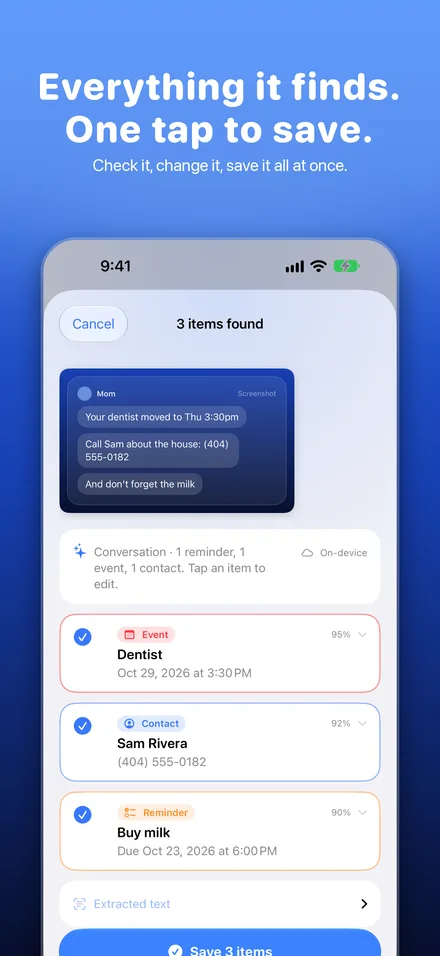
Then add a screenshot-to-task app alongside either calendar for the messy stuff: school emails, dentist appointment texts, group-chat plans. Screenshot it, it's done. We built Shotodo for exactly that, and it saves a lot of typing when the family schedule lives in five different apps.
How do you make a shared family calendar on iPhone using Apple's built-in Family Sharing?
Turn on Family Sharing in Settings
Open Settings, tap your name at the top, then tap Family Sharing. Tap Add Member and send an invite to your partner by text or email. They accept on their phone and you're linked. Family Sharing works across iPhone, iPad, and Mac, and one adult can act as the organizer who manages the group.
Create and share the Family calendar
Open the Calendar app and tap Calendars at the bottom. Tap Add Calendar, name it something plain like Family, and set it to be shared. When Family Sharing is on, iOS offers a Family calendar automatically, but a separate one for sports and school dates keeps things tidy. Tap the info button next to the calendar, then Add Person to invite your partner. Everyone you invite can add and edit events, not just see them.
Add events the whole household sees
Tap the plus button in Calendar, type the event, and pick the Family calendar before saving. A dentist appointment added this way shows up on your partner's phone within seconds, with alerts on both ends. The catch is the typing: every school email and group-chat plan still has to be entered by hand, event by event. That's where a screenshot-to-task app like Shotodo earns its keep, turning a screenshot of a text or email into a reminder or calendar entry without all the typing (https://shotodo.app/screenshot-to-task/). Apple's setup is free and reliable, but it only saves your family effort if getting events into it is easy.
Can an iPhone and Android family share one calendar for free?
Yes. Google Calendar is free, works on both phones, and is the simplest way for a mixed iPhone-and-Android household to see the same events. Everyone needs a Google account, which costs nothing.
Set up Google Calendar on the iPhone
Download the Google Calendar app from the App Store and sign in with the family's Google account. Create a calendar called "Family" and keep appointments, school events, and bills on it so they stay separate from work.
Invite the Android side of the family
On the web version at calendar.google.com, open the Family calendar's settings and add your partner's Gmail address as a viewer or editor. Editor is the right choice if both parents add events. On their Android phone, the calendar appears in Google Calendar automatically.
Make it show up in the iPhone Calendar app
You don't have to live in two apps. The iPhone's built-in Calendar app can display Google calendars: add the account under Settings > Apps > Calendar > Calendar Accounts > Google, then toggle Family on. Apple documents how sharing iCloud calendars works here, and Google calendars behave the same way once added. One catch: reminders and screenshots still need typing, which is where Shotodo fits alongside it (see pricing).
When does Google Calendar beat Apple's shared family calendar on iPhone?
Google Calendar wins when your household is split between iPhone and Android. Apple's Family Calendar works best when everyone is on an iPhone; add one Android partner and sharing gets clunky. Google Calendar runs the same on both phones, free.
| Apple Family Calendar | Google Calendar | |
|---|---|---|
| Mixed iPhone + Android | Clunky | Works the same on both |
| A colour per person | Limited | Each family member gets their own colour |
| Reminders alongside events | Separate app | Built into the same calendar |
| Works without a Google account | Yes | No |
Google also handles reminders better: a dentist appointment and a "don't forget the milk" note can live in one place, where Apple splits them between Calendar and Reminders.
Where Apple still wins: no new account to set up, invites arrive in the Messages app, and birthdays from Contacts show up automatically. If every adult in the house is on iPhone, stay with Apple. If one of you is on Android, Google Calendar is the simpler choice, and pairing it with Shotodo means a screenshot of a school email turns into a reminder without typing.
How do you sync a shared family calendar across iPhone and Android step by step?
The fastest free route is Google Calendar: one parent creates a family calendar and shares it, and both phones show the same events.
On the iPhone
Download Google Calendar from the App Store and sign in with the Google account that owns the family calendar. Open Settings inside the app, tap the account, and make sure the family calendar's toggle is switched on so it appears alongside your Apple calendars.
On the Android phone
Google Calendar is usually preinstalled. Sign in with a Google account that's been invited, then check Settings > Manage accounts to confirm sync is turned on for that account. Google documents the sharing step in its guide to sharing your calendar with specific people, which is where you add your partner's email as a viewer or editor.
Test it before you rely on it
Add a dentist appointment on one phone and confirm it shows up on the other within a minute. If it doesn't, check that both phones have background refresh and sync enabled for the calendar app.
What breaks first in Apple Family Sharing calendars and how do you fix it?
Events someone added don't show up
The usual culprit: your partner added the dentist appointment to their personal calendar instead of the shared one. On iPhone, open the event, tap Calendar, and switch it to Family. To stop the mix-up repeating, set the Family calendar as the default in Settings > Calendar > Default Calendar, so new events land in the right place without thinking.
Someone left Family Sharing and the calendar vanished
The shared calendar lives inside Family Sharing, so leaving the group takes the calendar with it. Nothing is lost: Apple keeps the events, and rejoining the same Family Sharing group brings the calendar back. If a family member genuinely leaves, copy important events to a personal calendar first, or move to a calendar that works outside Family Sharing.
Kids under 13 and shared calendars
Apple requires children under 13 to be part of Family Sharing through a child account, which you set up and control from your own iPhone. Kids can see the shared family calendar and add events, but you approve the account and can set limits. For younger children, a simple view-only arrangement works: they check my calendar for practice times and rides, and you handle the adding.
Which shared family calendar app on iPhone is actually free without limits?
Apple's built-in shared family calendar is genuinely free with no limits, but it only works if every family member is on iPhone with Family Sharing set up. The moment your partner has an Android, it stops being an option.
Google Calendar is the free pick for mixed households. You can add your Google calendar to the iPhone Calendar app so everything shows in one place, and Google documents how to do this in its Calendar Help guide. Syncing events across iPhone and Android costs nothing.
Family planner apps like FamPlanIt - Family Planner are free to download but typically gate features like extra lists or reminders behind a subscription. Check before your household commits.
Shotodo is free to try and handles one narrow job: screenshot a school email or group-chat plan, and it becomes a calendar event or reminder without typing. Where it falls short: it is not a shared family calendar. You still need Apple or Google underneath it for the sharing part.
How do you get school emails and group-chat plans onto the family calendar without typing?
Screenshot it, it's done
The dentist texts a reminder, the coach posts a schedule change, the school email lists the assembly date. Every calendar app in this guide assumes you'll retype those details yourself. Shotodo, our own app, skips that step: screenshot the message, and it turns into a reminder or calendar event on your iPhone, no typing.
It fits the same test we used above: it's free to try, works alongside Apple Calendar or Google Calendar rather than replacing them, and handles the one job no shared calendar does well, which is catching plans the moment they arrive in a text or email.
Where Shotodo falls short
It won't manage chores, shopping lists, or a partner on Android the way FamPlanIt aims to, and it doesn't replace a full family planner. It also reads what you screenshot, so blurry or cluttered screenshots can miss details worth double-checking. Screenshot it, confirm the event, done.
FAQ
Can my husband see my calendar on iPhone without Family Sharing?
Yes. In the Calendar app, tap Calendars, tap the info button next to your personal calendar, and use Add Person to invite his Apple ID. He can view or edit without any Family Sharing setup. Family Sharing just automates it by creating a shared Family calendar for the whole group.
Do both people need iCloud for a shared family calendar on iPhone?
Both need an Apple ID signed into iCloud, since Apple's shared calendars run on iCloud. If one of you won't use an Apple ID, a shared Google Calendar is the alternative: it syncs to the iPhone Calendar app and to any Android phone for free with a Google account.
Is there a truly free shared family calendar app for iPhone and Android?
Google Calendar. It is free on both phones, and everyone needs only a free Google account. Apple's built-in Family Calendar is also genuinely free with no limits, but only when every family member is on iPhone. Third-party family planner apps are usually free to download with features gated behind subscriptions.
Why don't events my wife adds to our shared calendar show up on my iPhone?
She is most likely saving events to her personal calendar instead of the shared one. She should open the event, tap Calendar, and switch it to Family. To stop the mix-up repeating, set Family as the default under Settings > Calendar > Default Calendar so new events land in the right place automatically.
An AI tool helped draft this page. Shotodo checked and published it. Spot an error? Tell [email protected].