 Shotodo
 By
In brief
- A follow-up reminder email needs four parts: the specific item, a one-line ask, a real date, and an easy way to reply, all in under 100 words.
- The 3-5-7 rule spaces follow-ups 3-5 days, then 5-7 days, then 7 days apart, escalating from gentle nudge to firm reminder to final notice.
- Emails between 50 and 125 words get the highest reply rates according to Boomerang's analysis of over 400,000 emails.
- Stop after three touches: silence after a final notice is an answer, so log it and move on to clients who reply.
- Screenshot a client's message naming a day and turn it into a reminder in one tap with Shotodo so the follow-up actually gets sent.
What should a follow-up reminder email to a client actually say?
A follow-up reminder email to a client needs four things: the specific item, what you need, the date, and a one-line way to reply. Keep the whole thing under about 100 words.
The four parts every client follow up email needs
Reference the exact invoice, quote or project update by number and amount, because "just checking in" gives your client nothing to search their inbox for. Restate the ask in one sentence: "Could you approve the $1,200 quote for the kitchen refit?" Give a date that means something: "by Friday at 5pm" beats "soon" every time. Then make replying a one-line job. End with a question they can answer with a single word, and offer the easy out: "If it's on your list for next week, just say so and I'll stop nudging." Skip the apology for following up; you're doing your client a favour by making the decision easy.
Write it the way you'd say it across the school gate, not the way a press release talks: plain words, short sentences, no "circling back" or "per my last email". If your client reads it on their phone between school pickup and a call, those four parts are all they'll see before they decide to reply or swipe away. And when you spot the moment in a text or screenshot, Shotodo turns it into the reminder with one tap, no typing.
Why short emails get faster replies
Boomerang's analysis of over 400,000 emails found that messages between 50 and 125 words get the highest reply rates, and replies drop sharply past 500 words (Boomerang). Short emails read as easy to answer, and easy-to-answer emails get answered.
When should you send each follow-up?
Follow-ups work on a rhythm, not on vibes. Send too early and you look desperate; wait too long and the client forgets the original ask. The fix is a fixed sequence: the 3-5-7 rule.
The 3-5-7 rule for follow-up timing
| Follow-up | When to send | What it does |
|---|---|---|
| Gentle nudge | 3-5 business days after the original ask | Assumes they got busy, gives them an easy out |
| Firm reminder | 5-7 days after the nudge | Names the deadline and asks for a yes or no |
| Final notice | 7 days after the firm reminder | States what happens next if you don't hear back |
So a quote sent Monday gets its nudge the following Thursday or Friday morning, the firm reminder the next week, and the final notice roughly three weeks after you first asked. Adjust only if the client told you they were on holiday or the project has a fixed milestone in between.
Best days and times to hit send
Tuesday through Thursday, mid-morning, is the sweet spot. Avoid Friday afternoons, when your email gets buried under the weekend, and Monday mornings, when inboxes are triaged and anything non-urgent gets archived. If the moment to follow up lands on a bad slot, screenshot the "send Friday follow-up" note from your messages and turn it into a reminder for Tuesday at 10am so the timing rule runs itself (Shotodo: Turn Screenshots into Reminders and Events).
Template 1: the gentle nudge (first follow-up)
The first follow-up assumes your client is busy, not rude. Send it 3 days after your last email, keep it under 80 words, and give them an easy way to close the loop. This fits the 3-5-7 escalation pattern recommended in sales-outreach guides like HubSpot, which suggests spacing reminders further apart as silence continues.
Gentle nudge template to copy and paste
Subject: Quick one, [Name]
Hi [Name], just floating this back to the top of your inbox. I sent over [the invoice / the quote] on [date] for [project]. If it got buried, no problem at all. A quick "yes, go ahead" or "not right now" is all I need. If the timing's off, tell me and I'll check back in [a week / next month]. Thanks!
How to adapt it to invoices, quotes and approvals
For invoices, swap the ask to payment timing: "If it's easier, tell me a date that works and I'll note it." For quotes, add a deadline heads-up so the urgency is theirs, not yours: "Heads-up that my pricing holds until [date]." For approvals, restate the cost of waiting in one line: "The [date] install slot goes back on the shelf Friday if I don't hear back."
When the "send Friday follow-up" moment hits you in the school pickup line, screenshot the client's last message and turn it into a reminder with Shotodo. One tap puts the follow-up on your calendar, no typing.
Template 2: the firm reminder (second follow-up)
The second follow-up names the missed date, states what happens next, and asks for a reply by a named day. No apology openers this time.
Firm reminder template to copy and paste
Subject: Quote for [project] — need a decision by Friday
Hi [Name],
Following up on my email from [date]. The quote for [project] was based on a start date of [date], and that window closes Friday.
If I don't hear back by Friday 5pm, I'll need to requote at current rates and push your start to [later date].
Could you reply with a yes, a no, or a "call me"? Any of the three works.
Thanks, [Your name]
What changes from the first nudge
The nudge asked a question. The firm reminder states a consequence: timeline slip or price change. You name the day and the hour, and you ask for a specific reply, not a vague "let me know your thoughts."
Send it 3-4 business days after the nudge, mid-morning Tuesday through Thursday. If the request arrived as a text or screenshot ("send the firm one Friday"), screenshot it and let Shotodo turn it into the reminder in one tap, no typing (Shotodo Changelog).
Template 3: the final notice (last follow-up)
This one sets a date and a consequence, then stops. You are not threatening the client; you are closing the loop so you can move on with a clear conscience.
Final notice template to copy and paste
Subject: Closing the file on [project/invoice #] — need a yes or no by Friday
Hi [Name],
I haven't heard back on my last two notes, so I don't want to keep landing in your inbox.
If I don't hear from you by Friday, [date], I'll assume the timing isn't right and I'll pause the work / close out the invoice. If something changed on your end, just reply with a one-liner and I'll adjust.
Either way, thanks for the chance to quote this.
[Your name]
Three things make it work: one clear deadline, one plain consequence, and an easy exit for them. Keep it under 100 words so it reads in ten seconds on a phone.
When to stop following up and move on
After a final notice with no reply, stop. Silence after three touches is an answer, even if it isn't the one you wanted. Most people genuinely mean to reply; the average office worker gets roughly 120 emails a day, so your message slipped, not them plotting against you. Log it, free up the mental space, and put your energy into clients who answer.
How do you follow up without sounding pushy?
The tone rule is simple: write about the project, not the complaint. "The deck is ready for your notes" reads better than "I still haven't heard back." Lead with the work, keep the ask at the end, and stop after three emails before you pick up the phone.
Phrases to use and phrases to cut
Use "when you get a chance to confirm" instead of "if you're still interested." "When" assumes the project is alive; "if" invites the client to let it die. Give them a graceful exit: "I know this week is packed, so no rush past Friday." That line protects the relationship and quietly sets a deadline.
Cut phrases like "just checking in," "per my last email," and "as previously mentioned." They all translate to "you're ignoring me" without adding information. Say what you need and when instead: "Could you approve the quote by Thursday so we hold your install slot?"
When to switch from email to a phone call
Three emails with no reply means the inbox is the problem, not the client. Call, leave one short voicemail, and name the deadline in it. If you're mid-conversation in a text thread, screenshot the "send Friday follow-up" promise so it becomes a reminder instead of a memory.
How do you remember to actually send the follow-up?
The writing takes two minutes. The forgetting happens three days later, when the client's "I'll get back to you Friday" is buried under school emails and the family group chat. The fix is to capture that promise the moment you read it, as a dated reminder.
Screenshot to reminder in one tap
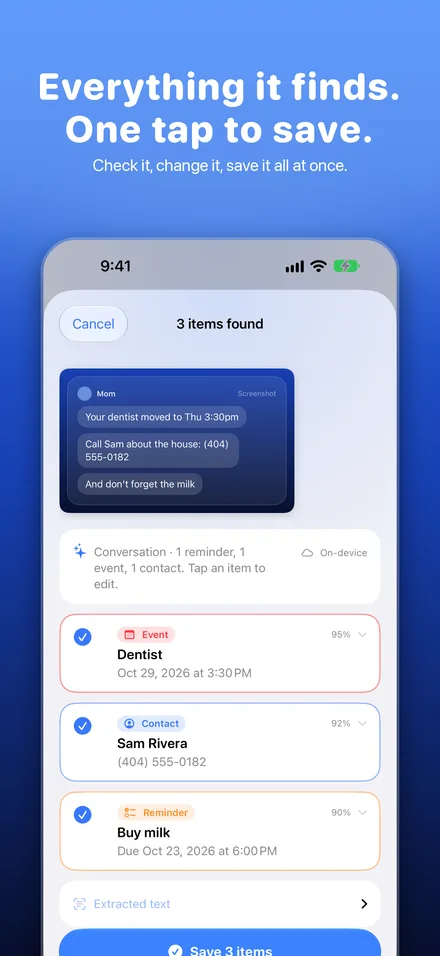
Screenshot the text or email where the client names a day. In Shotodo, that screenshot becomes the reminder itself: one tap, no typing, and it lands in Reminders with the date pulled from what the client said. This is exactly the "don't forget the milk" moment, just pointed at an invoice instead.
Setting the reminder for the 3-5-7 schedule
Whichever template you send, set the reminder for the day you'll send the next one. Apple's Reminders app lets you set a date and time and get an alert (Apple Support). Client says Friday? Screenshot it, set the reminder for the following Monday, and the nudge is already queued before you close the thread.
How do the follow-up tools compare for a solo business owner?
What to compare on
Judge any follow-up tool on three things: how fast a reminder gets in, whether it lands in the calendar you already check, and whether you keep using it after week two. If setup takes longer than the chore itself, you'll stop. The honest test is whether the tool fits the way your day actually arrives, which for most parents is as texts and screenshots, not as neatly typed entries.
Where a reminder app is enough and where it is not
Typing "send Friday follow-up" into Apple Reminders by hand works fine if you only chase one or two clients a month. It's free, it's already on your phone, and there's nothing new to learn.
The gap shows up on busy weeks. A client texts "can you send that quote?" while you're in the school pickup line, and typing the reminder means pulling over or forgetting it. That's the job Shotodo is built for: screenshot the message, one tap, and it becomes the reminder or calendar event, no typing. Next to direct alternatives like SnapLater - Screenshot as todo, or adjacent options like TaskLoop Planner and FamPlanIt - Family Planner, the honest comparison is scope. If you want a full family planner or a task hub, those exist. If your follow-up problem is "I saw it, I meant to send it, I forgot," a simple screenshot-to-reminder beats a bigger system you'll abandon.
FAQ
How many times should I follow up with a client before giving up?
Three touches, then stop. Send the gentle nudge 3-5 days after the original ask, the firm reminder 5-7 days later, and a final notice a week after that. If the final notice gets no reply, silence is your answer. Log it, close the file, and put your energy into clients who respond.
Is it unprofessional to send a follow-up reminder email?
No. A short, plain follow-up makes the client's decision easier, not harder. Keep it under about 100 words, name the specific invoice or quote, and give a real deadline. Skip apologetic openers like "just checking in" or "per my last email." You're doing them a favour by making the reply a one-line job.
What do I put in the subject line of a client follow up email?
Name the project, invoice, or quote, and state what you need. "Quote for [project] — need a decision by Friday" beats "Quick question" because the client knows what the email is before opening it. For the final notice, signal the stakes: "Closing the file on [project/invoice #] — need a yes or no by Friday."
Should I follow up on an invoice differently than a project update?
Slightly. For invoices, ask about payment timing and offer flexibility: "Tell me a date that works and I'll note it." For approvals or project updates, restate the cost of waiting in one line, like an install slot expiring Friday. The structure stays the same: specific item, one-line ask, real date, easy reply.
How do I set a reminder to follow up on my iPhone without typing it all out?
Screenshot the message where the client names a day, then use Shotodo to turn that screenshot into a reminder in one tap, with the date pulled from what the client said. No typing required. Alternatively, Apple's Reminders app works if you don't mind entering the date and time by hand.
Shotodo published this guide. A first draft came from an AI tool. Something wrong? Email [email protected].