 Shotodo
 By
Below you'll find the exact Siri phrasing, the missed-call shortcut, how to make sure the notification actually fires, and the few cases where a dedicated app is worth the download.
How do I set a call back reminder on iPhone without an app?
You have three built-in paths: type it into Reminders, tap the missed call in the Phone app, or ask Siri. All three take under a minute and need nothing installed.
Option 1: Type it into Reminders in 15 seconds
- Open Reminders and tap the + in a list.
- Type "Call back Dr. office re: form."
- Tap the reminder, then tap the info (i) icon.
- Toggle on "Remind me on a day" and pick today or tomorrow.
- Toggle on "Remind me at a time" and set when you want the nudge. You can also add an early reminder, like 30 minutes before.
Apple's own guide to setting dates, times and alerts in Reminders walks through these toggles if you get stuck.
Option 2: Tap the missed call in Recents
- Open Phone and tap Recents.
- Find the missed call and swipe left on it.
- Tap the share or info button, then tap "Remind Me" where offered, or create a new Reminder manually with the name prefilled.
Option 3: Ask Siri while your hands are full
Say: "Hey Siri, remind me to call Mom back at 4pm." Siri saves it with the time set. For a location-based version, try "Remind me to call the dentist when I get home."
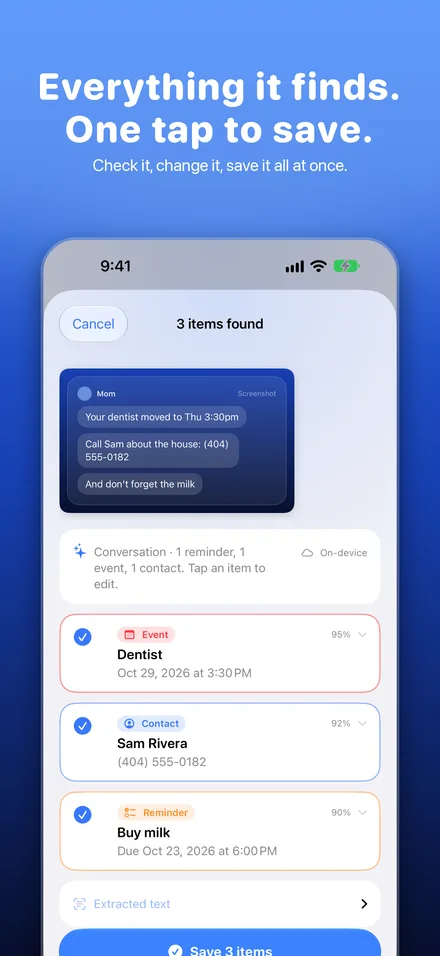
If most of your call-backs start as screenshots or texts instead of missed calls, Shotodo turns a screenshot into a saved reminder in one tap.
Can Siri create a reminder to call someone back?
Yes. Hold the side button (or say "Hey Siri") and use any of these word for word:
Siri phrasings that work word for word
- "Remind me to call the dentist back at 3pm."
- "Remind me to call Mum back tomorrow morning."
- "When I talk to [person] next, remind me to ask about the form." Siri attaches it to that contact, so it pops up after your next call or text with them.
- "Remind me to don't forget the milk" works too, but naming the task is clearer: "Remind me to pick up the milk."
The location-based trick: remind me when I leave work
Say "Remind me to call the school back when I leave work" or "when I get home." Siri saves it with a location trigger, so the reminder fires the moment you arrive or leave. This is the one that saves you when the dentist's office closes at 5 and you're still at your desk at 4:45.
What Siri gets wrong and how to fix it
Siri sometimes saves "call the school back" as a note or picks the wrong list. Check the Reminders notification right away and say "show it to me" to confirm. If the time is wrong, say "change it to 4pm." For anything with details attached, like a screenshot of a school email, Shotodo saves it in one tap (https://shotodo.app/screenshot-to-task/).
How do I set a call back reminder from the Phone app's missed call screen?
The Remind Me option on a missed call
Open the Phone app and tap Recents. Find the missed call, swipe left on it, and tap the Remind Me button (or tap the info "i" icon and choose Remind Me). iOS then asks when you want the nudge: In 1 hour, tonight, or When I leave or arrive at a location. Pick one and a reminder to call back appears in Reminders automatically, with the phone number attached so you can tap it from the alert.
You can also say "Hey Siri, remind me to call back" right after the missed call, and Siri drafts it for that contact (Apple's list of Siri commands for Reminders).
Why the built-in callback flag is easy to miss
The swipe-left Remind Me button is hidden unless you know it exists, and the default options are vague: "In 1 hour" can land mid-school pickup, and "When I leave" only works if location permissions are set. For a dentist appointment callback at a specific time, a full Reminders entry with an exact time beats the quick flag. Apps like Shotodo help more with typed and texted requests than missed calls, since a screenshot of a group chat still needs saving by hand.
What's the difference between a Reminders alert and a scheduled call in Calendar?
Use Reminders when you just need a nudge
A Reminders alert is a tap-and-go nudge: "Remind me to call the dentist at 3pm." It fires, you snooze it or tick it off, and it's done. Reminders is the right home for call backs that don't own a fixed slot, like returning the school office or that missed call from the plumber.
Use Calendar when the call needs a real slot
A Calendar event blocks actual time. If you must call the insurance company before they close at 5, put it on the calendar at 4:30 so nothing else lands on top of it.
| Reminders | Calendar | |
|---|---|---|
| Best for | Quick nudges, snoozing | Protected time slots |
| Snooze | Yes, one tap | No |
| Shows on shared family calendar | No | Yes |
Both sync across your iPhone. If a screenshot of a texted "call me back" is your starting point, Shotodo (https://shotodo.app/privacy/) turns it into a reminder without retyping.
How do I make sure a call back reminder actually fires with a notification?
Set a time and an early alert
A reminder with no time is a note, not an alarm. When you create it, tap the info icon, turn on "Remind me on a day" and "Remind me at a time," and pick the moment you can actually make the call, like 3:00 p.m. during the school pickup gap. Then set an early alert, say 15 minutes before, so you can wrap up what you're doing first.
Check Focus and notification settings so nothing gets silenced
If you run a Focus for work or sleep, Reminders alerts can be silenced without you noticing. Go to Settings > Focus, tap the active Focus, and add Reminders under Allowed Apps. While you're there, check Settings > Notifications > Reminders and make sure banners and sounds are on. Apple's Phone app guide covers how missed-call reminders work alongside these alerts on iOS 26.
Snooze and repeat for the call you keep postponing
When the alert fires and you can't call yet, swipe the notification and tap Snooze to push it 15 minutes, or set a Repeat (daily or hourly) for the dentist's office that never answers. If you'd rather screenshot the missed call and have it saved as a reminder without typing, Shotodo handles that, and recent updates are listed on the changelog.
Can I attach a contact or phone number to a call back reminder on iPhone?
Linking a contact to a reminder
Yes. When you create a reminder, type the person's name and Reminders underlines it as a link to that contact. Saying "Remind me to call Sarah tomorrow at 4" does the same thing. The reminder then shows Sarah's name, and you can tap it to see her number, email or message options. You can also paste a raw phone number straight into the reminder title if the person isn't in Contacts.
Calling straight from the notification
When the reminder fires, tap the notification and you land in the reminder itself. Tap the underlined contact name and choose Call to dial without opening the Phone app or searching. One catch: the link only works if the name matches a contact exactly, and the notification itself doesn't show the number, so check the reminder before you swipe it away.
When does a call back reminder app beat the built-in iPhone options?
Three criteria to decide
Count how the callbacks reach you. If they come as missed calls in the Phone app, Siri and the built-in reminder cover you. If they arrive inside texts, school emails and group chats, you are screenshotting and retyping, and that is where a dedicated app earns its spot. Second, volume: one or two a week, built-ins win. Third, whether you need the number attached automatically or can tap the contact yourself.
Where Shotodo fits, and where it doesn't
Shotodo reads a screenshot and saves it as a reminder in one tap, so a texted "call me back" or a dentist appointment in a school email becomes a reminder without retyping. The honest weak spot: for pure missed calls, it adds nothing, because the Phone app already offers a callback button and a reminder. If your callbacks come mostly as missed calls, skip it.
Notifications still depend on your iPhone settings, not the app. If reminders stay silent, check that Do Not Disturb or a Focus isn't swallowing them, per Apple's guide to Focus and notification settings.
Other call back reminder apps to know
SnapLater, Shotted and SnapAction work from screenshots too. FamPlanIt and Todoist handle family and task planning more broadly, but expect to type the call details yourself.
What's the fastest way to turn a texted 'call me back' into a reminder?
When the "call me back" is buried in a sports-team thread or a family group chat, screenshot it. Open Shotodo, and it reads the screenshot and saves it as a reminder in one tap. No retyping the number, no switching apps, no forgetting which chat it was in.
Screenshot it, save it, get on with your day
Take the screenshot, tap once in Shotodo, and it lands in your reminders with the details from the message. It's done. You can get back to the school run.
When the screenshot route wins over typing
For a single call, telling Siri "Remind me to call Mum back at 4" is faster. The screenshot route earns its keep when the message has a time, a place, or a name you'd have to retype, or when you're triaging a dozen group-chat messages at once.
FAQ
Does the iPhone have a built-in call back reminder app?
Yes. Reminders comes preinstalled and handles call backs fine: type the task, tap the info icon, and set "Remind me on a day" and "Remind me at a time." You can also swipe left on a missed call in the Phone app's Recents list and tap Remind Me, which creates the reminder with the number attached.
How do I get Siri to remind me to call someone back when I leave work?
Hold the side button or say "Hey Siri," then use the exact phrasing: "Remind me to call the school back when I leave work." Siri saves it with a location trigger, so the alert fires the moment you leave. You can swap in "when I get home" for arrival-based nudges. Check the notification right away to confirm the trigger saved correctly.
Why didn't my reminder to call back go off?
The most common cause is a reminder with no time attached; it just sits in the list. Open it, tap the info icon, and enable "Remind me on a day" and "Remind me at a time." Then check Settings > Focus and add Reminders under Allowed Apps, plus Settings > Notifications > Reminders, so a work or sleep Focus isn't silencing the alert.
Can I set a recurring reminder to call someone every week on iPhone?
Yes. Create the reminder, tap the info icon, and set your date and time as usual. Then tap Repeat and choose Weekly. This suits the dentist's office that never answers or a standing check-in. When the alert fires and you can't call yet, swipe the notification and tap Snooze to push it back 15 minutes instead of losing it.
Is there a free reminder call back iPhone option, or do I have to pay?
You don't have to pay. Siri, the Reminders app, and the Phone app's Remind Me button are all built in and free, and they cover missed-call callbacks well. A dedicated app only earns its spot if your callbacks arrive as screenshots of texts or school emails, and even then it's worth testing whether the built-ins suffice first.
Recap
- Say "Hey Siri, remind me to call Mom back at 4pm" and iOS saves a timed reminder in under 10 seconds.
- Swipe left on a missed call in Phone > Recents and tap Remind Me to create a callback reminder with the number attached.
- A reminder with no time set is just a note; enable "Remind me on a day" and "Remind me at a time" so the alert actually fires.
- Add Reminders under Allowed Apps in Settings > Focus so a work or sleep Focus doesn't silence your call back alerts.
- Built-in options cover missed calls, but a screenshot-based app like Shotodo wins when callbacks arrive inside texts or emails.
This page began as an AI draft. Shotodo is responsible for it. Found a mistake? [email protected].