 Shotodo
 By
Key takeaways
- There is no single best family schedule app for iPhone; the right choice depends on whether your household is co-parenting, two working parents, or activity-heavy.
- Most family schedule apps are free for one person but gate sharing, reminders, or extra members behind paid plans.
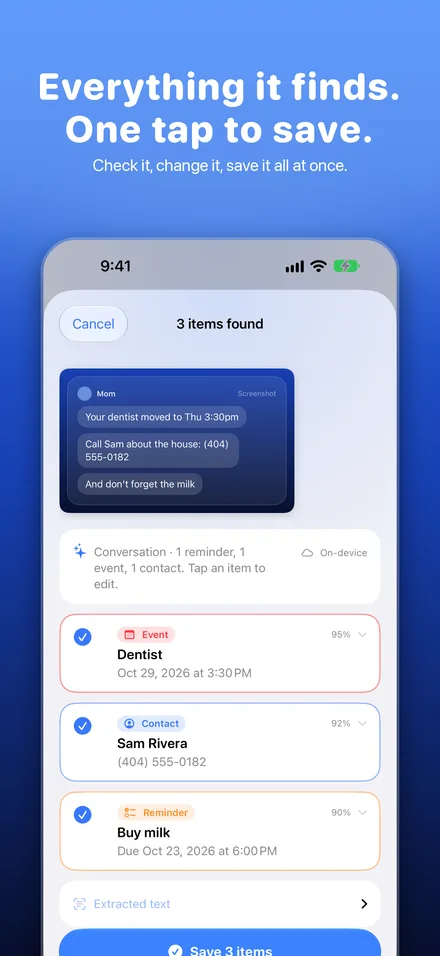
- Shotodo turns screenshots of school emails and group chats into reminders and calendar entries, saving typing, but it does not replace a shared family calendar.
- A plain shared Apple calendar is enough when events arrive as confirmed dates, but not when details arrive buried in texts and emails.
- Shotodo and similar screenshot-to-task apps set up fastest, while Todoist and FamPlanIt require accounts for every family member before sharing works.
The best family schedule app for most iPhone households is the one that matches your situation: a co-parenting setup needs court-proof clarity, two working parents need a shared calendar that survives school emails and sports group chats, and kids' activities need reminders someone actually sees. This comparison judges each app on those scenarios, then shows exactly what each free plan lets you do before you pay a cent.
Which family schedule app is best for iPhone in 2025?
There is no single winner: the best family schedule app is the one that matches how your household actually gets organised. Shotodo fits parents whose to-dos arrive as screenshots from school emails and group chats, since you screenshot it and it's done as a reminder or calendar entry. FamPlanIt suits families who want one shared planner everyone can see. Todoist works best for households that already live in lists and want chores and appointments in one system. All three are on the App Store, where you can check each listing's current free tier before downloading. If you want to see how Shotodo handles a dentist appointment buried in a text before committing, the about page shows the flow end to end.
Which family schedule apps have a genuinely usable free plan?
A free plan is usable if you can screenshot a school email or a dentist appointment text and get it onto your calendar without paying, every day, for the whole family. Most apps let you start free, then gate the parts busy parents hit first: sharing, reminders, or how many screenshots you can turn into tasks per month.
What the free tiers actually include
| App | What free gets you | What you'll likely hit first |
|---|---|---|
| Shotodo | Turn screenshots into reminders, calendar events, and contacts | Monthly limits on screenshots saved |
| SnapAction | Basic screenshot-to-task setup | Limits on how many tasks free accounts can create |
| Shotted | Core screenshot-to-reminder flow | Feature and volume caps as usage grows |
| Todoist | Full to-do list and calendar view for personal use | Sharing and reminders sit behind the paid plan |
| FamPlanIt | Shared family planner basics | Member limits and premium features gated |
Where the paywalls sit
The pattern is consistent: single-person use is free, family-wide use costs money. Todoist is the clearest example, since reminders and sharing are paid features. FamPlanIt gates extra family members. Shotodo keeps the core screenshot-to-task flow free, with monthly limits, and its data practices are laid out plainly at shotodo.app/privacy. If your household runs on one phone, free tiers cover you. If two parents need the same list, expect to pay somewhere.
Which app fits a co-parenting schedule versus a two-parent household?
Co-parenting: handoffs, custody days, and two households
Shared custody lives or dies on clarity about whose day it is. You want an app where both homes see the same calendar, custody days are marked once and repeat without anyone re-entering them, and handoff details (who's picking up, from where) sit right on the event. FamPlanIt - Family Planner is built around the family-planner idea, which can work here, but the test is whether your ex will actually install and check it. If one household won't adopt the app, a plain shared calendar both parents already use beats a fancier tool one parent ignores. Also check the free tier: if adding the second parent or viewing past weeks sits behind a paywall, that's a real cost in a two-household setup.
Two working parents: one calendar, less typing
For one household with two busy parents, the problem is different: information arrives as school emails, texts, and group chats, and someone has to turn it into calendar entries. This is where Shotodo fits: screenshot the dentist appointment or the team message, and it becomes a reminder or calendar entry, which "saves a lot of typing" (product brief, UK review, iOS, Oct 2026). Both parents can forward or screenshot the same message rather than one person transcribing everything. Plan prices and trial length are on Shotodo's pricing page, and new capture improvements land regularly per the Shotodo changelog. One honest gap: Shotodo handles the capture side well, but it won't manage custody rotations the way a dedicated co-parenting tool aims to, so co-parenting families may still need a shared calendar underneath it.
What should a family schedule planner app include for kids' activities?
Kids' activities live in messy places: a coach's text about a moved practice, a school email with three dates buried in four paragraphs, a sports group chat where kickoff time changes weekly. A family schedule app needs to handle three things well. First, it should turn a screenshot of any of those messages into a reminder or calendar event in a couple of taps, so "don't forget the milk" and "dentist appointment" both land where you'll actually see them. Second, it should let you edit before saving, because coaches write vague times ("around 4-ish") that need cleaning up. Third, it should keep each child's events visible together, so you can spot the Tuesday collision between swim and soccer.
Apps like FamPlanIt focus on the shared family view; Todoist handles lists well but expects you to type tasks yourself. Shotodo takes the screenshot route: screenshot it, check the details, it's done. Where it falls short: it won't sync a co-parent's schedule automatically, so shared households still need a shared calendar underneath.
When is a shared calendar enough instead of a dedicated family schedule app?
If every family event starts as a confirmed date and time, Apple's shared calendars cover it. You can create a Family calendar, invite everyone in your household, and share events across iPhones with automatic updates (Apple iCloud support). Dentist appointment at 4pm? Add it once, everyone sees it.
A shared calendar stops being enough when the information arrives as messy text: a school email with three dates buried in a paragraph, a sports group chat announcing a changed kickoff, a text from your co-parent saying "recital moved." Nobody types all that in, so it never lands on the calendar.
That's the gap a dedicated app fills. A screenshot-to-task app like Shotodo (https://shotodo.app/screenshot-to-task/) lets you screenshot the email or message and turn it into a reminder or calendar entry, which saves a lot of typing. If your events mostly arrive by text and email, that earns its place; if they arrive by invitation, the free calendar already does the job.
How do the top family schedule apps compare on setup time and learning curve?
Setup time matters more than feature lists when the person installing the app is between school pickup and dinner. Todoist takes the longest: you create an account, learn its projects and labels, and then each family member needs their own login before anything is shared. FamPlanIt follows a similar path, since a household planner only works once every parent joins.
Shotodo is the fastest to start. Install it, screenshot a dentist appointment or a school email, and the reminder or calendar entry appears. There is nothing to configure and no account juggling, which is why the "saves a lot of typing" reaction is common. The trade-off: it works from screenshots, so it does not replace a shared family calendar where everyone sees each other's plans.
SnapAction and Shotted sit in between, with quick setup but a narrower job than a full planner.
Where do family schedule templates fit alongside an app?
A template is the skeleton; the app is what keeps it alive. A printed weekly grid works until a dentist appointment lands on a Thursday and the whole page needs rewriting. Apps handle the changes; templates give you the starting shape.
Using a daily family schedule template for routines
Routines like school mornings, bedtime, and Saturday chores barely change week to week, so a daily family schedule template covers them well. Sites like 101Planners offer printable and editable options you can fill in once and reuse (family schedule templates). The honest gap: a template won't remind anyone or move things when a practice gets cancelled. That's where the app earns its keep — screenshot the school email or the group chat message, and the appointment lands on the calendar without typing. Template for the rhythm, app for everything that changes.
How does Shotodo handle school emails and group chat screenshots?
Shotodo works differently from a shared calendar app. When a school email says picture day is Thursday or a group chat mentions "don't forget the milk," you screenshot it, and Shotodo turns it into a reminder or calendar entry. No retyping dates, no switching apps mid-scroll. That covers the moment most family details actually arrive: buried in a text or an email you'll never open again.
It fits alongside whatever calendar your family already runs, rather than replacing it.
Where Shotodo falls short as a family planner
Shotodo is not a shared family calendar. It has no shared view for a partner, no recurring weekly schedule for two households, and no way for a co-parent to see what you added. If your main problem is two adults coordinating, a dedicated family schedule app does that job and Shotodo doesn't.
Where it earns its spot is the inbox-to-calendar gap: screenshot it, it's done, and your calendar stays the source of truth.
FAQ
Is there a completely free family schedule app with no subscription?
Mostly no for family-wide use. Single-person use is free across most apps, but the features busy parents hit first, like sharing with a partner or reminders, tend to sit behind paid plans. FamPlanIt gates extra family members, Todoist puts sharing and reminders behind its paid tier, and Shotodo keeps the core screenshot-to-task flow free with monthly limits.
Can I turn a screenshot of a school email into a calendar event on iPhone?
Yes. Screenshot-to-task apps like Shotodo, SnapAction, and Shotted turn a screenshot of a school email or text into a reminder or calendar entry in a couple of taps, with a chance to edit vague details like "around 4-ish" before saving. Shotodo also converts screenshots into contacts, though free plans cap how many screenshots you can save monthly.
What's the best app to organize a family schedule with teenagers?
Teenagers' schedules arrive as group chats, moved practices, and last-minute changes, so an app that captures messy text fast matters most. Shotodo handles that capture side, while Todoist suits teens who already live in lists and can manage their own logins. For seeing everyone's week at a glance, FamPlanIt's shared planner view works, provided each teen actually joins.
Do both parents need the same app installed for a shared family calendar to work?
For a dedicated family planner like FamPlanIt, yes: each parent needs the app and an account before anything is shared, which is also why setup takes longer. If one parent won't install anything, a plain shared calendar both already use beats a fancier tool one ignores. Shotodo sidesteps this partly, since either parent can screenshot the same message.