 Shotodo
 By
That diagnostic habit, not a longer to-do list, is how you stop forgetting the milk, the party at 2, and the school form due Monday.
Quick answers
- Every forgotten thing breaks at one of three stages: attention, encoding, or retrieval, and each needs a different fix.
- Forgetting where you put something is usually an attention failure, so a fixed tray by the door beats trying to remember.
- A screenshot feels like you've dealt with an invite or form, but without a date or alert it sits in your camera roll until it's too late.
- Give every reminder a time or location trigger so it resurfaces at the right moment instead of hiding in a list.
- For ADHD, lower capture friction to a screenshot plus one tap and keep a single inbox rather than five lists.
How do you match the fix to the type of forgetting?
You stop by matching the fix to the failure, not by trying harder to remember. Every forgotten thing breaks at one of three stages: you never paid attention to it, it never got stored properly, or you couldn't pull it back when you needed it. Psychologists call these attention, encoding, and retrieval, and each one fails for a different reason (APA dictionary entry on memory stages).
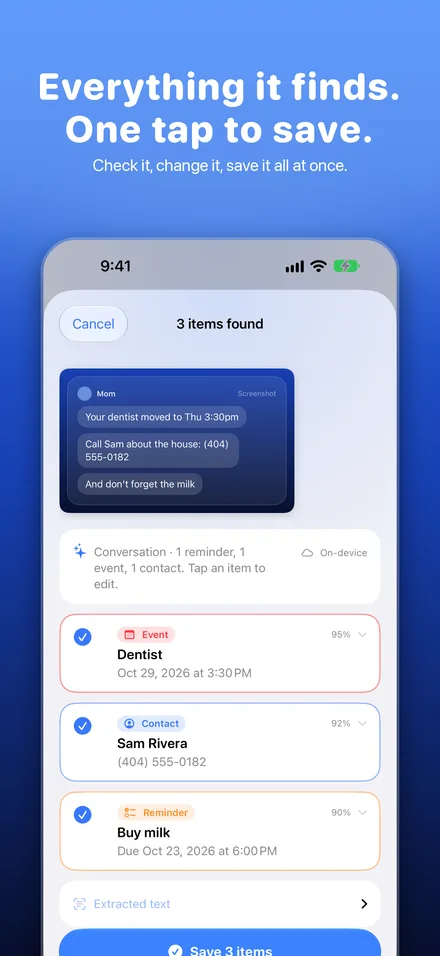
Diagnose first, then fix. A dentist appointment you never really registered needs a capture habit, not a better calendar. A screenshot buried in your camera roll was stored but not retrievable, which is the problem Shotodo solves: screenshot it, one tap turns it into a reminder or event, no typing. Shotodo handles iOS only and stores data per its privacy policy.
Why do I keep forgetting where I put things?
You didn't forget the location. You never registered it. Your hands put the keys down while your brain was still on the school form due Monday, so there's nothing to recall later. That's an attention failure, not a memory failure.
The 5-second self-test: was it an attention failure?
Ask one question: could you picture setting the item down? If the honest answer is a blur, you were thinking about something else at the moment it left your hand. A true memory slip looks different: you remember the kitchen counter but can't remember whether you moved it after. Blurry means attention. Clear-but-wrong means memory.
One tray beats a perfect memory
The fix is to make putting things down automatic, so attention doesn't matter. One tray by the door. Keys, wallet, sunglasses, always there. No decision, no thought, nothing to remember. For the phone, skip the tray: Find My on a family member's iPhone shows you where it is in seconds.
The same principle applies to anything that arrives as a screenshot: if you have to think about where it went, you won't. That's the idea behind Shotodo (about): the moment of saving takes one tap, no typing, so it happens even when your mind is on the next thing.
Why do I forget things so easily even when I'm paying attention?
Because hearing something isn't the same as storing it. Your friend says the party is Saturday at 2, you nod, and the detail never lands anywhere your future self will look. That's an encoding failure: the information arrived and then evaporated. The fix is to capture it the moment you hear it, in an app you already trust like Reminders or Calendar.
The screenshot backlog is an encoding failure
Most parents already capture things, they just capture them into a graveyard. You screenshot the party invite, the school form, the dinner plan in the group chat, and all three sit in your camera roll with no date, no alert, no nudge. A screenshot feels like you've dealt with it, but it's stored in a place you'll never check at the right moment. That's why the camera roll is where good intentions go to die. Workers toggle between apps 1,200 times a day and lose nearly four hours a week just resetting their attention, per ClickUp's guide to productivity tools, and a reminder buried in photos is one more place to check.
Capture in one tap: where Shotodo fits and where it doesn't
Shotodo turns a screenshot into a reminder, event or contact with one tap, no typing, so the party invite becomes a Saturday-at-2 calendar entry instead of a photo. The point matters because the failure mode of most capture tools is friction: opening an app, typing the task, picking a list, and setting a date is four decisions, and each one is a chance to abandon the capture. Shotodo collapses that to screenshot plus tap, which you can complete in the two seconds you were already holding the phone, before the thought evaporates. Run honestly through the same criteria: it fixes encoding only if you actually tap, and it does nothing for attention (missing the message entirely) or retrieval (having the reminder but ignoring it). It's a fix for one of the three types, not all three.
How do I stop forgetting important things like deadlines and appointments?
Deadlines and appointments rarely vanish because you never learned them. They vanish because the information sits in your head or in a message, and nothing pulls it back out at the right moment. The fix is a trigger, not a better memory.
Give every reminder a trigger, not just a list
A list item with no time or place attached will not resurface when you need it. In Apple Reminders, set an alert for "Saturday 1:30 pm" before the party, or a location alert so "pick up dry cleaning" pings when you're near the cleaner. If the reminder arrives while you're mid-errand, it did its job.
Screenshots work the same way. Shotodo turns a screenshot into a reminder or calendar event in one tap, no typing, so the school form photo becomes "form due Monday" instead of a buried image. Recent updates are listed in the Shotodo changelog.
The 10-minute Sunday sweep
Once a week, scroll back through messages and screenshots for anything that never became a reminder. The school form due Monday is the classic miss: it arrived Thursday, you thought "later," and by Sunday night it's three screens deep. Catch it in the sweep, give it a Monday morning alert, and it's done.
How do I stop forgetting small things throughout the day?
Small things fail because they arrive inside conversations. The milk request sits in a text thread, the dry cleaning reminder is buried three chats down, and no list ever gets opened. The fix is two rules, not a new habit.
Capture before you reply
Any request inside a chat gets captured before you answer it. Spouse texts "milk and dry cleaning"? Add it to your list first, then reply "got it." A screenshot works too: Shotodo turns it into a reminder with one tap, no typing, so the capture happens in the two seconds you were already holding the phone.
One shared list for the household
Keep one shared Reminders list everyone can see, and put every request there. When the family group chat starts planning dinner, whoever suggests the grocery run adds it to the shared list instead of hoping someone scrolls back. One list, one place to look, nothing living only in a thread.
How do I stop forgetting things if I have ADHD?
ADHD makes working memory unreliable, so each of the three fixes needs a lower-friction version. Capture has to be near-zero effort: screenshot the school email, then one tap to turn it into a reminder, no typing. Triggers have to be external and loud, not something you plan to "remember later." And one capture inbox beats five lists you will never check again.
Lower the capture cost to almost zero
If capturing a task takes typing, it will not happen mid-chaos. A screenshot plus one tap is the ceiling you can actually hit while holding a toddler and a grocery bag. Shotodo works this way on iOS: screenshot it, one tap, it becomes the reminder, event or contact.
External triggers beat internal memory
Set reminders that announce themselves. Apple's Reminders can alert you when you arrive at or leave a place, so "don't forget the milk" fires in the store parking lot, not in your head. For a lost phone carrying your whole calendar, Find My locates it.
One inbox, not five lists
Pick a single place every capture lands, then empty it into your calendar once a day. Competitors like SnapLater - Screenshot as todo and TaskLoop Planner exist in the same space, so test whichever keeps you to one inbox.
One honest note: no app treats ADHD. This is a coping system, and a professional evaluation matters.
How do I stop forgetting things at work?
Interruptions are attention failures, not memory failures
Most work forgetting starts the moment someone interrupts you. Workers toggle between apps 1,200 times a day and lose nearly four hours a week just resetting their attention, according to ClickUp's blog. You didn't forget to call back the supplier. You never encoded it, because a Slack message landed three seconds after the request.
The fix is to capture interruptions immediately instead of trusting yourself to come back. When a client mentions a deadline mid-call and your phone buzzes, don't hold both in your head. Screenshot the message, jot the deadline, and go back to the call. If you run a small business alone, you are the interruption handler and the interrupted. Write it down the second it arrives.
The end-of-day capture habit
Verbal requests die quietly. Someone stops by your desk, mentions a form, a call back, an invoice, and by 5 p.m. it's gone. Before you close the laptop, spend two minutes writing down every request anyone made of you today. Anything you already did gets crossed off. Anything not on paper becomes tomorrow's first reminder, not a Friday surprise.
What should I do the moment I realize I've forgotten something?
Fix the immediate problem first. Apologize, send the RSVP late, reschedule the dentist, or buy the milk on the way home. Recovery beats rumination, and it takes under a minute.
Then, while it's fresh, ask which type of forgetting happened. If you never wrote the party down, that's encoding: the fix is capturing it the second you see it, which is what Shotodo does with a screenshot. If you wrote it but never looked again, that's retrieval: set the reminder to fire Saturday morning. If you read the message and it slid out of your head, that's attention. Working memory drops things fast, especially with ADHD (CHADD).
Which fix matches which type of forgetting?
Every forgotten thing traces back to one of three failures, and each has a fix that takes seconds.
| Type | Tell-tale sign | The fix |
|---|---|---|
| Attention | You saw the message but never really read it | Screenshot it, then let Shotodo turn it into a reminder in one tap, no typing |
| Encoding | You read it, meant to deal with it later, then forgot | Same move: screenshot to a reminder or calendar event so it lands in the app you actually check |
| Retrieval | It's in your calendar but you don't see it at the right moment | Set the alert time when you add it, so the reminder comes to you |
If you only remember one rule: never trust "I'll remember." Screenshot it, tap once, it's done.
FAQ
Is forgetting things a sign of something serious?
Occasional slips are normal and usually trace to one of three failures: attention, encoding, or retrieval. You missed the message, never stored it, or nothing pulled it back. If forgetting starts disrupting work, relationships, or daily safety, or it worsens steadily, talk to a doctor. Otherwise, diagnose the miss and apply the matching fix.
Do I need a paid app to stop forgetting things, or will Apple Reminders do?
Apple Reminders is enough if you use it properly: give every entry an alert time or location so it resurfaces on its own. A paid app earns its keep only when capture is the bottleneck. If requests arrive as screenshots and typing is what stops you, one-tap conversion helps. Otherwise, save the money.
Why do I remember things at night but forget them by morning?
At night there are no interruptions, so you can actually rehearse the school form and the party. Sleep clears that rehearsal buffer, and morning brings a fresh flood of messages that crowds it out. The detail was never stored anywhere but your head. Capture it before bed, with an alert attached, and it survives.
How long does it take to build a capture habit that sticks?
There's no fixed number, but the habit sticks faster when the capture takes seconds and happens at the moment the request arrives. Typing a task into a list competes with whatever you were doing; a screenshot plus one tap does not. Anchor it to an existing trigger, like replying to a message, and it becomes automatic within weeks.
An AI tool helped draft this page. Shotodo checked and published it. Spot an error? Tell [email protected].