 Shotodo
 By
This hands-on walkthrough covers what sharing actually looks like on each family member's phone, where Cozi falls short, and when you'll want a screenshot-to-task companion like Shotodo alongside it.
What to know
- The Cozi family calendar app uses a shared family login, so everyone sees the same color-coded calendar without per-person invites.
- The free tier covers the shared calendar, shopping and to-do lists, and reminders, while Cozi Gold removes ads and adds a mobile month view.
- Cozi beats Apple's built-in shared calendar for households by adding shared lists and per-person color coding in one dedicated app.
- Cozi's biggest weakness is daily friction: events from school emails or texts must be retyped by hand.
- Pairing Cozi with a screenshot-to-task app like Shotodo turns school emails and texts into reminders without the typing.
What is the Cozi family calendar app and who is it for?
Cozi is a shared calendar app built for one job: keeping everyone in a household on the same page. Mom or dad sets it up, invites the family, and everyone sees the same dentist appointment, soccer practice, and school holiday in one color-coded view. It runs on iPhone (iOS 26+ works fine) and has a web version for the laptop crowd.
What Cozi includes beyond the calendar
The calendar is the core, but Cozi adds a shared to-do list, a shopping list, and a meal planner with a recipe box. The free tier covers the basics for the whole family; the paid Gold tier removes ads and adds extras like a month view on mobile and birthday scheduling, per Cozi's own pricing page. One honest note from us at Shotodo: our app (see our pricing) turns a screenshot of a school email into a reminder, but it doesn't share anything with your spouse. Cozi does the opposite.
Who it fits and who it doesn't
Cozi fits families with two or more people juggling schedules, especially parents who want one calendar everyone actually checks. It fits less well if you mainly need to capture tasks solo and fast, or if your household already lives happily in Apple's shared calendar.
How does Cozi handle calendar sharing between family members on iPhone?
Sharing your Cozi calendar works differently from Apple's built-in calendar, and the difference matters once you're trying to sync a household. Cozi runs on a shared family account model: everyone in the family logs into the same account with the same username and password. There is no per-person invite link to send, and no acceptance step where each family member says yes.
Inviting family members step by step
Open Cozi on your iPhone and tap Settings, then find the family members section. You add each person by name, and you can assign a color to them so their events stand out on the shared calendar. Next, you set up the shared login on each family member's phone: download Cozi, sign in with the family username and password, and the full calendar appears. That's the whole process. If your kids don't have their own phones yet, you can simply leave them off and the calendar still works for the adults.
What the other person's phone shows
Once signed in, every family member sees the same calendar with every event, color-coded by person. Add the dentist appointment on your phone and it shows up on your partner's phone right away. Nobody receives an invite or has to tap accept, which means nothing sits in a requests folder waiting to be approved. The tradeoff is that anyone with the login can edit anything, so a curious kid can just as easily delete an event as view it.
Notifications and reminders in daily use
Cozi lets each family member set their own reminders for events, so you can get a morning-of alert while your partner gets one the night before. Reminders arrive as push notifications, and the optional daily agenda email lays out the day at a glance. In practice, the shared login is the friction point to watch: if you change the family password, everyone's signed-out phones need the new one. That's why I keep a screenshot of our login details saved as a note in Shotodo (https://shotodo.app/privacy/), so the info is one tap away whenever a phone gets logged out.
Is Cozi actually free, and what does the paid tier add?
Yes, the Cozi family calendar app is free to use, and the free version covers the basics: a shared calendar, shopping and to-do lists, and reminders for everyone in the family. The catch is ads. Free Cozi shows advertising, and that is the main push toward the paid tier.
Cozi Gold is the subscription version. According to Cozi's help documentation, Gold removes ads and adds extras like a month view on mobile and additional reminder options. Pricing changes, so check the current cost in the App Store before deciding.
Here is the honest breakdown:
| Feature | Free Cozi | Cozi Gold |
|---|---|---|
| Shared family calendar | Yes | Yes |
| Shopping and to-do lists | Yes | Yes |
| Ads | Yes | Removed |
| Month view on mobile | No | Yes |
| Extra reminders | No | Yes |
For most families, the free version is enough. The upgrade is worth it mainly if the ads annoy you daily. Either way, Cozi only handles what you type into it, which is why we built Shotodo to turn a screenshot of a school email or a dentist appointment text straight into a reminder.
How does Cozi compare to Apple's built-in shared calendar for families?
If your whole family already uses iPhones, iCloud's shared calendar is free, already set up, and shows events in the same app you use for everything else. Cozi costs nothing for the basics too, but it's a separate app your partner and kids have to install and actually open.
Where Apple's shared calendar wins
Invites take seconds: you send a share link, family members accept, and events appear on their phones. Notifications come through the standard iOS alerts, so they show up on the lock screen like any other reminder. There's no new app to learn, no new login, and no chance a teenager "forgets" to check it.
Where Cozi wins
Cozi is built for households, not individuals. It adds a shared to-do list, shopping list, and a family-focused layout that a plain calendar doesn't have. Color-coding by family member makes it obvious who has the dentist appointment and who has practice, at a glance.
Where Cozi falls short: it can't grab a task from a school email or a text. When something arrives as a screenshot, a companion like Shotodo turns it into a reminder without the typing.
What are Cozi's biggest limitations for busy families?
The copy-and-paste problem with school emails and texts
Cozi works well once an event is in it. Getting it there is the slow part. The dentist appointment lives in a text, the bake sale date is buried in a school email, and the carpool swap is three messages deep in a group chat. With Cozi, you read the message, switch apps, retype the date, time, and location by hand, then hope you typed it right. On a Tuesday night with dishes in the sink, that retyping is the reason appointments still get missed.
Apple's built-in shared calendars have the same gap: Apple's support page on iCloud shared calendars describes inviting people and adding events manually, but nothing that pulls details out of a screenshot (Apple Support).
Where Shotodo fills the gap
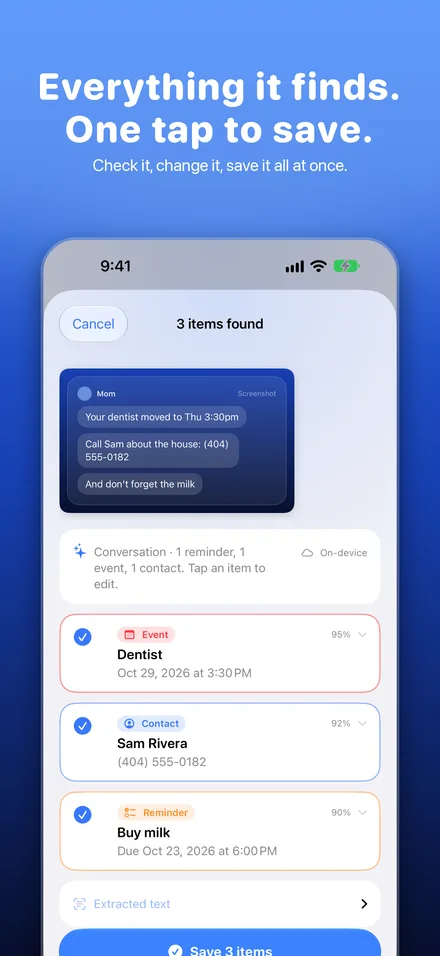
Screenshot it. It's done. Shotodo takes a screenshot of the school email or text and turns it into a reminder or calendar entry, saving a lot of typing. It doesn't replace Cozi, it feeds it. It also lacks shared family views, so check the changelog before relying on it for anything more than fast entry.
How does Cozi compare to other shared family calendar apps?
Families usually compare Cozi against three kinds of options: Apple's built-in shared calendar, a general to-do app like Todoist, and a family planner like FamPlanIt. Cozi's edge is that it was built for households first, so sharing, the family message board, and the shopping list live in one place rather than bolted on. Its App Store listing shows a strong rating and broad iOS support, which matters when every parent and teen needs the same app installed (Cozi on the App Store).
Todoist handles reminders well but treats your family like any other project list. FamPlanIt leans into planning together, while Cozi stays closer to a plain shared calendar. SnapAction and Shotted sit in a different category entirely: they turn a screenshot into a task rather than giving everyone a shared view.
Honestly, Cozi's weakness here is notifications and daily friction, not features. If your school email pile is the real problem, pairing Cozi with a screenshot-to-task app like Shotodo covers the gap better than switching calendars.
When should a family pick Cozi over other shared family calendar apps?
Pick Cozi if your household runs on one shared view: two parents, a few kids, and a mix of dentist appointments, practices, and school events that everyone needs to see. It fits families who want a dedicated family space rather than a work calendar repurposed for home, and who want the free tier to be genuinely usable.
Look elsewhere if your family already lives in Apple's shared calendar and only needs occasional reminders, or if your main problem is turning texts and school emails into events. In that case, a screenshot-to-task tool like Shotodo pairs better with what you already use, since you screenshot it and it's done.
Cozi's honest weak spot is daily friction: adding events still means typing them yourself.
FAQ
Can you use the Cozi family calendar app on iPhone and Android at the same time?
Yes. Cozi runs on both iOS and Android, plus a web version, and everyone shares the same family account across devices. Because the app is built on a shared login rather than per-person invites, a parent on iPhone and a teen on Android see the same color-coded calendar as long as both are signed in with the family credentials.
Does Cozi send reminders to family members who never open the app?
Yes, as long as they are signed in on their phone. Each family member can set their own reminder timing for events, and those arrive as push notifications without opening the app first. Cozi also offers an optional daily agenda email. The catch: if a device gets logged out after a password change, reminders stop until that person signs back in.
Is Cozi safe for kids' information and family data?
Cozi is designed for family use and requires only basic details like names and colors for each member. The main consideration is the shared account model: anyone with the family login can view and edit everything, including deleting events. Review Cozi's own privacy documentation before adding details about minors, and keep the family password away from younger kids.
Can I add events to Cozi from a screenshot or school email without typing them out?
Not natively. Cozi has no way to pull details from a screenshot, text message, or school email, so you retype the date, time, and location by hand. A companion app like Shotodo fills that gap: screenshot the school email and it becomes a reminder you can then add to Cozi. The two work together rather than replacing each other.
Do both parents need a paid Cozi subscription?
No. Cozi Gold is tied to the shared family account, not to individual people, so one subscription covers everyone who signs in with the family login. Free Cozi also covers the whole household, with ads as the tradeoff. Upgrade mainly if the ads bother you or you want the mobile month view and extra reminder options.
Note on the writing: AI assisted, Shotodo edited. Send fixes to [email protected].