 Shotodo
 By
In brief
- Triage your task pile in five minutes: dump everything into one place, sort into today, this week, and someday, then pick at most three for today.
- When everything feels urgent, the earlier real deadline wins; if deadlines match, prioritize whoever is actively waiting on you.
- New inputs, not slow clearing, are why your list never shrinks, so capture each task the moment it arrives instead of trusting your memory.
- Cap the two-minute rule at two small items during triage, then start the deadline task before small chores eat your window.
- Never say yes on the spot; reply 'I can do this Thursday' or make the trade-off visible so the person asking decides what slips.
What do Reddit threads about too many tasks at work actually say?
The recurring scenarios: dropped favors, growing lists, message overload
The same situations show up again and again in threads on r/productivity and r/ADHD: a request arrives in a text or email, gets mentally noted, then vanishes. Someone promises to call back and forgets. A list of chores grows faster than it shrinks because every new message buries the last one. Parents describe running the family calendar entirely from their inbox and group chats, with nothing written down until something slips.
What the advice in the top comments has in common
The top comments rarely argue for a bigger system. They push the same three moves: capture the task the moment it arrives, give it a time or place, and ignore everything that can wait until tomorrow. The tools matter less than the one-tap speed of capture, which is exactly the gap Shotodo's screenshot-to-task flow (https://shotodo.app/screenshot-to-task/) is built to fill.
Why does your to-do list keep growing no matter what you finish?
Because the list isn't a record of your day. It's a pile of requests from other people, and new ones keep landing while you work through the old ones.
New inputs arrive faster than you clear old ones
Reddit threads on doing too much at once tend to land on the same explanation: you finish three things and five more messages arrive. A spouse asks for milk, a school email mentions a form due Monday, the family group chat picks a dinner date. Clearing tasks isn't the bottleneck, incoming messages are. That's why the list feels the same length on Friday as it did on Monday, even though you got plenty done.
The list mixes 'must do' with 'might do'
The other upvoted observation: half the list was never a commitment. "Call the dentist" sits next to "maybe reorganize the garage," and both look equally unfinished. When everything shares one list, done items can't feel like progress. Splitting must-do from might-do, and putting each item where it belongs (a reminder, a calendar event, a note), is the fix most threads describe. The about page explains the same idea from the app side: capture the task the moment you see it, in whatever form it takes.
How do you triage a pile of tasks in five minutes?
Step 1: Dump everything into one place
Open a note, your Reminders app, or wherever you keep screenshots, and write down every open item: the milk, the dry cleaning, the school form due Monday, Saturday's party at 2. Don't sort yet. The point is getting it out of your head, because half-remembered tasks cost more attention than written ones. Workers toggle between apps around 1,200 times a day, losing nearly four hours a week just re-focusing (ClickUp), and a mental pile does the same thing to you.
Step 2: Sort into today, this week, and someday
Go down the list and tag each item: today, this week, or someday. A party Saturday at 2 goes in this week. The school form due Monday can be someday until Thursday. Resist the urge to rank within each pile; you're only deciding when, not how.
Step 3: Pick three for today and ignore the rest
Choose three items for today, at most. Three fits around school runs and dinner. The rest stays parked without guilt, because it's been triaged, not forgotten.
Worked example: a Tuesday with 14 open items
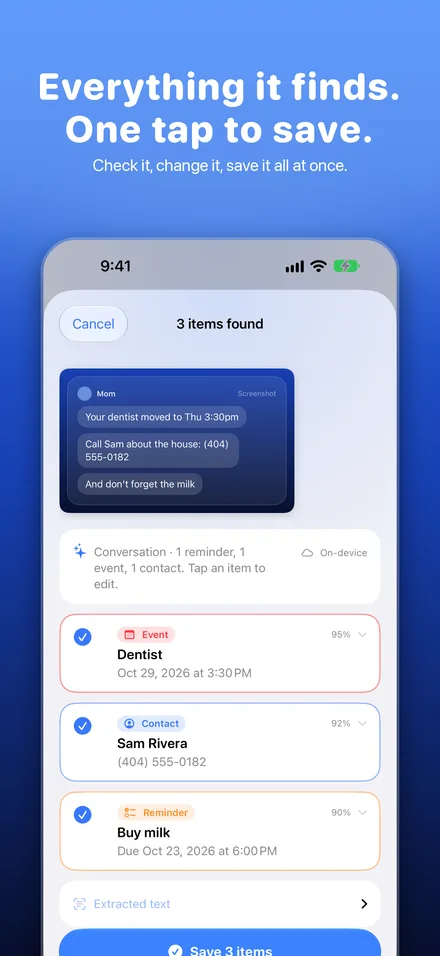
Say your pile has 14 items. Sorting takes two minutes: two land in today (call back the dentist, sign the form if it's actually due), five in this week, seven in someday. Picking your three takes one more minute. If the dentist request arrived as a screenshot, Shotodo turns it into a reminder in one tap, no typing, which is how the pile gets captured in the first place. Fourteen items, five minutes, and tomorrow starts with three things instead of a fog.
Which tasks should you do first when everything feels urgent?
Deadline first, then who is waiting
When two things both feel urgent, the tie-breaker Reddit threads keep landing on is simple: the earlier real deadline wins. A school form due Monday beats a party Saturday at 2, even though the party is more fun. If deadlines match, ask who is waiting. A spouse standing at the store needs an answer before a group chat does.
Write the deadline next to each task when you triage. "Dentist" means nothing. "Dentist, call back by Thursday" means you know exactly when it jumps the queue.
The two-minute rule and when it backfires
The classic advice says: if it takes under two minutes, do it now. That works for "reply yes to the party." It backfires when you spend your whole triage window doing small tasks while the big one, the form due Monday, sits untouched.
So cap it: during your five-minute sort, do at most two two-minute items, then start the deadline task. If a screenshot holds the details, Shotodo turns it into a reminder in one tap, no typing, and your data stays handled per the privacy policy (https://shotodo.app/privacy/).
How do you capture tasks without typing them all out?
The screenshot problem: capture is easy, follow-through is not
You already capture everything. The school email gets a screenshot, the party invite gets a screenshot, the milk text stays in Messages. The pile of images in your Photos app is your real to-do list, and it never gets shorter. As Built In puts it, "maybe your to-do list is a tangle of competing priorities that never seems to get shorter" (Built In). The fix isn't a better system you'll abandon by Thursday. It's making the step after the screenshot take one tap instead of ten minutes of typing.
Turning a screenshot into a reminder or event in one tap
Shotodo takes that screenshot and turns it into the reminder, event, or contact directly. Screenshot the dentist appointment, tap once, and it's in your calendar. No retyping the date, no switching apps. It ships on iOS (App Store) and the changelog shows steady updates. Compared with SnapLater or TaskLoop Planner, the pitch is the same capture flow, but Shotodo pushes the result into the Apple apps you already use.
How do you say no or push back when the tasks keep coming?
'I can do this Thursday' beats 'yes'
The most common advice in Reddit threads about being overloaded is simple: never say yes on the spot. Say "I can get to this Thursday" instead. You have not refused, but you have stopped the new task from jumping the queue. If Thursday is genuinely impossible for the person asking, they will tell you now instead of Friday.
Making the trade-off visible to whoever is asking
The second move is showing your plate. "I can do the school form today, or the dentist appointment and the dry cleaning, but not all three. Which one slips?" works at home exactly the way it works at work. The person asking usually knows the answer, and you are no longer the one holding an impossible list alone.
The same rule applies to what lands on your phone. A screenshot of the group chat planning Saturday dinner can become a calendar entry in one tap with Shotodo, so saying "yes" to the party costs you nothing later.
Which apps do Redditors recommend when the list lives in your head?
The advice in Reddit threads is usually the same: pick one capture spot, make it take under five seconds, and stop trusting your memory. The tool matters less than the habit, but the wrong tool kills the habit by Tuesday.
What a capture tool has to do to survive a busy week
It has to work mid-chaos. You see the dentist appointment in a school email or the party time in the group chat, and you need it in your calendar or reminders before someone starts talking to you. If capturing means opening an app, finding the right list, and typing it all out, you won't do it.
Comparing the options honestly, including Shotodo
| Tool | How you capture | Best fit |
|---|---|---|
| SnapLater - Screenshot as todo | Screenshot becomes a to-do | Screenshot-first capturers |
| TaskLoop Planner | Structured planner entry | People who like lists |
| FamPlanIt - Family Planner | Shared family planning | Coordinating with a partner |
| Shotodo | Screenshot becomes a reminder, event, or contact, one tap, no typing | Parents living in Apple's stock apps |
Shotodo runs the same test honestly: it wins on capture speed for iPhone users on iOS 26 or later, and it costs $5.99 a month or $39.99 (App Store listing). If your household needs a shared planner everyone edits, FamPlanIt fits that job better.
How do you keep the triage habit going past week two?
Anchor it to an existing moment
Habits that need a new time slot die. Habits attached to something you already do survive. Reddit follow-up advice keeps pointing the same way: tie the triage to a moment that happens anyway, like waiting in the school pickup line or the first two minutes after the kids are down. Same trigger, same five minutes, every day.
Lower the bar until it is boring
The week-two failure is usually ambition: you try to sort everything perfectly, miss one day, and quit. Instead, aim for "good enough" triage. If all you do is pick the dentist appointment and the school form and let the rest wait, that counts.
Capture helps here too. Screenshot the group chat, and Shotodo turns it into the reminder with one tap and no typing. Fewer steps means fewer skipped days, and the habit holds because it never asks much of you.
FAQ
Is it normal to feel overwhelmed by tasks at work, or is it just me?
It's normal, and Reddit threads on r/productivity and r/ADHD repeat the same scenarios: requests arrive by message, get mentally noted, then vanish. The list feels the same length on Friday as Monday because new inputs land faster than you clear old ones. The pile isn't a personal failure; it's a capture problem, not a discipline problem.
What is the 1-3-5 rule for to-do lists?
It's a way to cap a day: one big task, three medium ones, five small ones. It matches the triage advice in the article, which says pick three for today and park the rest without guilt. The exact numbers matter less than deciding the night before what 'done' means, so tomorrow starts with a short list instead of a fog.
How do I stop forgetting things people ask me in passing?
Capture the task the moment it arrives, before the next message buries it. Top comments agree the tool matters less than one-tap speed: a screenshot of the request should become a reminder without typing. Written tasks cost far less attention than half-remembered ones, and a written deadline, like 'call back by Thursday,' tells you exactly when it jumps the queue.
Should I use one list for work and home or keep them separate?
One capture spot, then sort by when, not by category. The article's worked example mixes a dentist call, a school form, and a party in the same pile, tagged today, this week, or someday. Splitting must-do from might-do matters more than splitting work from home, since both kinds of items compete for the same hours.
How much does Shotodo cost and is there a free trial?
Shotodo costs $5.99 a month or $39.99, per its App Store listing, and runs on iOS 26 or later. The article doesn't state whether a free trial exists, so check the App Store listing before downloading. It turns screenshots into reminders, events, or contacts in one tap, pushing results into the Apple apps you already use.
Shotodo published this guide. A first draft came from an AI tool. Something wrong? Email [email protected].